Calculate shipping rates with carrier services
A carrier service (also known as a carrier calculation service or delivery service) provides SHOPLINE with real-time shipping rate calculations.
After installing the carrier service app, merchants can go to the SHOPLINE Admin and navigate to Settings > Shipping and delivery. In the Shipping fees section, set up General shipping rates or Custom shipping profile, and then click Add a shipping rate under the Zones and shipping rates section of the corresponding page. In the pop-up dialog, select Use a carrier or third-party app to calculate rates, select the added carrier service, and complete the settings. At checkout, shipping rates will be calculated in real-time based on the settings.
How it works and implementation steps
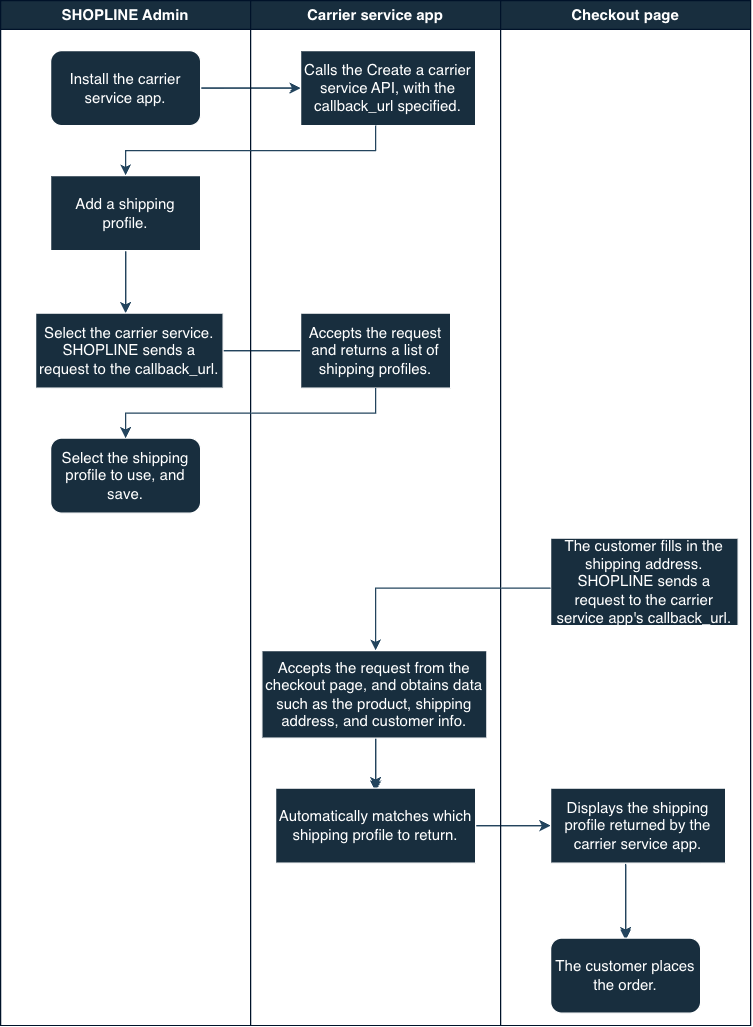
To provide real-time shipping rate calculations, follow the procedure below:
1. App development and deployment
Develop a public app and publish it to the SHOPLINE App Store, or create a private carrier service app for a merchant. For details, refer to App development.
2. Service configuration for merchants
When a merchant wants to add a carrier service to their store, the carrier service app needs to first call the Create a carrier service API to create the service for the merchant.
You must configure a valid callback_url in the request. SHOPLINE will send requests to your carrier service app through this callback URL, primarily for the following scenarios: shipping service retrieval and shipping rate calculation.
Your carrier service app must:
- Receive and process requests from SHOPLINE.
- Calculate shipping rates in real time based on the provided order information.
- Return calculation results in the specified SHOPLINE API response format.
3. Shipping profile configuration in the SHOPLINE Admin
When a merchant configures a shipping profile in the SHOPLINE Admin and selects your service under Use a carrier or third-party app to calculate rates, SHOPLINE will initiate a request to your callback_url to retrieve available shipping services. The details are as follows.
Parameters
SHOPLINE sends a request to the callback_url, containing the following parameters:
origin: Origin addressdestination: Destination addressitems: Product informationcurrency: Currencylocale: LanguageX-Shopline-Shop-Id: Store IDX-Shopline-Shop-Domain: Store domainX-Shopline-Hmac-Sha256: Digital signature
Parameter handling rules
The parameter handling rules vary according to the service_discovery mode, as follows:
| Mode | Origin & destination | Product parameters | Currency type |
|---|---|---|---|
service_discovery: false | Both the origin and destination default to the store's preset addresses. | product_id and variant_id are left empty. | Store currency |
service_discovery: true | The origin is the origin address configured in the shipping profile. The destination is the destination country or region configured in the shipping profile. (The system uses virtual addresses to trigger multiple requests.) | product_id and variant_id are left empty. | Store currency |
Request optimization logic
During checkout, a large number of API requests are generated. This requires you to pay attention to the request load. To reduce unnecessary requests, SHOPLINE applies the following optimization logic:
-
Origin handling rule
When the "Origin group" in the shipping profile is set to the default group, the store's default address is used as the origin. It is combined with thedestinationparameter to generate requests. -
Destination handling rule
When the "Other countries and regions" option is selected in the shipping profile, the destination is fixed to one of the following six countries: Singapore, UK, USA, Australia, Brazil, and South Africa. It is combined with theoriginparameter to generate requests. -
Deduplication mechanism
- Origin: Deduplication is performed at the country or region level, with addresses filtered based on priority.
- Destination: Deduplication is performed at the country or region level, and requests are initiated using virtual addresses.
4. Retrieval of the shipping profile during customer checkout
When a customer uses the carrier service to settle shipping costs, SHOPLINE will send a shipping rate calculation request to your app via the callback_url. The details are as follows.
Parameters
The core parameters include:
origin: Origin address (defaults to the store's preset address)destination: Destination address (the delivery address provided by the customer during checkout)items: Product informationcurrency: Currencylocale: LanguageX-Shopline-Shop-Id: Store IDX-Shopline-Shop-Domain: Store domainX-Shopline-Hmac-Sha256: Digital signaturecustomer: Customer information
Currency handling rules
The following rules outline how SHOPLINE processes currency data and handles exchange rate conversions.
- Request currency: The system uses the order's checkout currency.
- Currency conversion: If the returned shipping fee currency differs from the
currencyparameter provided in the request, SHOPLINE will perform a conversion based on real-time exchange rates before calculating the final shipping cost.
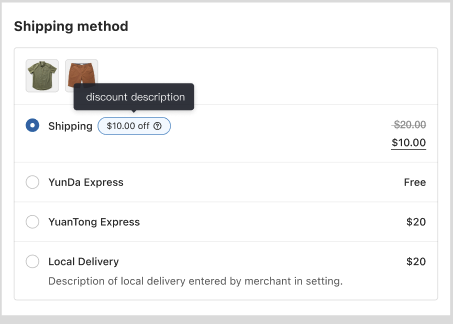
During checkout, the SHOPLINE checkout page will display all available shipping profiles and their corresponding real-time shipping rates to the customer (provided that these shipping profiles have been configured properly in the SHOPLINE Admin).
API reference
Carrier service APIs
| API | Description |
|---|---|
| Create a carrier service | Creates a new carrier service to provide real-time shipping rate calculations. SHOPLINE requests the service's callback_url to obtain the service and shipping rate information. |
| Get all carrier services | Retrieves a list of all carrier services for the store. |
| Get a carrier service | Retrieves information for a specific carrier service by its ID. |
| Update a carrier service | Updates a specified carrier service. Only the app that created the carrier service can update it. |
| Delete a carrier service | Deletes a specified carrier service. Only the app that created the carrier service can delete it. |
When calling the Create a carrier service or Update a carrier service API, you can pre-configure the metafields for Customer and ProductVariant resources via the metafield parameter. These metafields will be automatically passed through when SHOPLINE requests the callback_url to retrieve real-time rates on the checkout page.
| Parameter | Type | Required | Description |
|---|---|---|---|
| metafield | object[] | No | The metafield information. |
| metafield.resource | string | No | The metafield resource. Only Customer and ProductVariant are supported. |
| metafield.identifiers | object[] | No | The metafield-defined information. |
| metafield.identifiers.key | string | No | The metafield-defined key. |
| metafield.identifiers.namespace | string | No | The metafield-defined namespace. |
A maximum of 50 keys are supported. Exceeding this limit will result in an error.
callback_url data specifications
Request headers
| Field | Type | Required | Description |
|---|---|---|---|
| X-Shopline-Hmac-Sha256 | string | Yes | The payload of the signed request body (the JSON string converted using Jackson). |
| X-Shopline-Shop-Id | string | Yes | The store ID. |
| X-Shopline-Shop-Domain | string | Yes | The store domain. |
Request body
| Field | Type | Required | Description |
|---|---|---|---|
| origin | object | Yes | The origin address. |
| destination | object | Yes | The destination address. |
| items | object[] | Yes | A list of line items, where amounts are net of both line-level and order-level discounts. |
| currency | string | Yes | The currency. Format: ISO 4217. Example: USD |
| locale | string | Yes | The locale, such as en. |
| is_express_checkout | boolean | Yes | Whether it is express checkout.
|
| customer | object | No | The customer information. Within the metafield object, a single key may have multiple values. This parameter is only included in requests originating from the checkout page. |
The origin, destination, items, and customer parameters are all objects containing sub-fields. Ensure you populate the corresponding sub-fields when passing these parameters. Refer to the sample code below for the specific data structures.
Sample parameters in a request to callback_url:
{
  "origin": {
    "country":"US",
    "postal_code":"02116",
    "province":"Massachusetts",
    "province_code":"MA",
    "city":"Boston",
    "name":"MAMAMAMAMA",
    "address1":"110 Huntington Avenue",
    "address2":"",
    "phone":"+16175952242"
  },
  "destination": {
    "country":"US",
    "postal_code":"02116",
    "province":"Massachusetts",
    "province_code":"MA",
    "city":"Boston",
    "name":"MAMAMAMAMA",
    "address1":"110 Huntington Avenue",
    "address2":"",
    "phone":"+16175952242"
  },
  "items": [
    {
      "name":"phone",
      "quantity":1,
      "grams":100,
      "price":0,
      "requires_shipping":true,
      "taxable":true,
      "product_id":"1607337290976137******0910",
      "variant_id":"1807337290976254******0910",
      "sku":"abc-123",
      "activity_type":"1",
      "benefit_type":"2",
      "properties": [
        {
          "name":"color",
          "value":"red",
          "show":"true",
          "type":"text",
          "urls":"https://img-va.myshopline.com/image/store/168076****839/fgsdfgs.jpg?w=588&h=386"
        }
      ],
      "selling_price": {
        "presentment_money": {
          "amount":"10.00",
          "currency":"USD"
        },
        "shop_money": {
          "amount":"10.00",
          "currency":"USD"
        }
      },
      "variant_metafield": [
        {
          "key":"sku_long",
          "value":"21"
        },
        {
          "key":"sku_width",
          "value":"22"
        },
        {
          "key":"sku_height",
          "value":"23"
        }
      ]
    }
  ],
  "currency":"HKD",
  "locale":"en",
  "customer": {
    "id":"460****098",
    "email":"test@gmail.com",
    "phone":"1321****678",
    "metafield": [
      {
        "key":"member_level",
        "value":"1"
      }
    ]
  }
}
Response body
| Field | Required | Description |
|---|---|---|
| service_name | Yes | The name of the shipping profile displayed to the customer during checkout. |
| description | No | The description of the shipping profile displayed to the customer during checkout. This parameter can be up to 300 characters long. If this limit is exceeded, the description will be truncated. |
| service_code | Yes | The shipping profile code. |
| currency | Yes | The currency. Format: ISO 4217. Example: USD |
| total_price | Yes | The shipping amount in minor units. Divide this value by 100 to get the actual amount. For example, if total_price is 500, the actual amount is 5 USD; if total_price is 100000, the actual amount is 1000 USD. |
| phone_required | No | Indicates whether the customer must provide a phone number at checkout. If the value is true, a phone number input field will be displayed under the selected shipping profile at checkout. |
| min_delivery_date | No | The earliest estimated delivery date and time for the shipping profile. Format: ISO 8601. |
| max_delivery_date | No | The latest estimated delivery date and time for the shipping profile. Format: ISO 8601. |
| shipping_discount | No | The shipping discount information, which contains the type, value, and description sub-fields. The description (up to 100 characters) specified by description will be displayed alongside the shipping profile on the checkout page. The valid values of type are percentage and fixed.
 |
Example of a carrier service returning real-time shipping rate:
{
  "rates": [
    {
      "service_name": "canadapost-overnight",
      "service_code": "ON",
      "total_price": "1295",
      "description": "This is the fastest option by far",
      "currency": "CAD",
      "min_delivery_date": "2023-06-08T23:59:59+08:00",
      "max_delivery_date": "2023-06-09T23:59:59+08:00",
      "shipping_discount": {
        "type": "fixed",
        "value": "10",
        "description": "This is a shipping discount"
      }
    },
    {
      "service_name": "fedex-2dayground",
      "service_code": "2D",
      "total_price": "2934",
      "currency": "USD",
      "min_delivery_date": "2023-06-08T23:59:59+08:00",
      "max_delivery_date": "2023-06-09T23:59:59+08:00",
      "shipping_discount": {
        "type": "fixed",
        "value": "10",
        "description": "This is a shipping discount"
      }
    },
    {
      "service_name": "fedex-priorityovernight",
      "service_code": "1D",
      "total_price": "3587",
      "currency": "USD",
      "min_delivery_date": "2023-06-08T23:59:59+08:00",
      "max_delivery_date": "2023-06-09T23:59:59+08:00",
      "shipping_discount": {
        "type": "fixed",
        "value": "10",
        "description": "This is a shipping discount"
      }
    }
  ]
}
Important notes
Signature verification
To ensure data security and validate the legitimacy of the request source, SHOPLINE signs each request before sending it to the carrier service’s callback_url. The carrier service app must verify the signature of every incoming request.
The signature follows the SHOPLINE webhook signing method and is generated using the HMAC-SHA256 algorithm. The content to be signed is the raw request body.
Example of the signature algorithm (Java):
/**
 * HMACSHA256
 * @param source signContent
 * @param secret appSecret
 * @return
 */
public static String HMACSHA256(String source, String secret) {
    if (StringUtils.isEmpty(secret) || StringUtils.isEmpty(source)) {
        return null;
    }
    try {
        Mac sha256_HMAC = Mac.getInstance("HMACSHA256");
        SecretKeySpec secret_key = new SecretKeySpec(secret.getBytes(StandardCharsets.UTF_8), "HMACSHA256");
        sha256_HMAC.init(secret_key);
        byte[] bytes = sha256_HMAC.doFinal(source.getBytes(StandardCharsets.UTF_8));
        return new String(Hex.encodeHex(bytes));
    } catch (Exception e) {
        e.printStackTrace();
        return null;
    }
}
Response timeout
If the response time for a carrier service API call exceeds 1500 milliseconds, a timeout is triggered.
Server-side request caching
SHOPLINE uses a server-side caching mechanism to optimize request efficiency. The specific caching rules are as follows:
- Cache trigger condition
When all of the following attributes of a shipping rate calculation request are exactly the same as those of a previous request, a cache hit occurs and the cached result is returned immediately:- Default shipping box weight and dimensions
- Currency
- Carrier service ID
- Origin
- Destination
- Product weight
- Digital signature
- Customer information
- Cache invalidation mechanism
A new request will be initiated if any of the following occurs:- Any of the attributes listed above changes.
- The cache has expired. (It automatically becomes invalid 10 minutes after the shipping rate information is returned.)

'%3e%3crect%20x='6'%20y='7.13049'%20width='13'%20height='10'%20rx='1'%20fill='black'/%3e%3cpath%20d='M12.4998%2012.936L-3.65042%200.604835L28.65%200.604838L12.4998%2012.936Z'%20stroke='white'%20stroke-linejoin='round'/%3e%3c/g%3e%3cdefs%3e%3cclipPath%20id='clip0_716_14611'%3e%3crect%20x='6'%20y='7.13049'%20width='13'%20height='10'%20rx='1'%20fill='white'/%3e%3c/clipPath%3e%3c/defs%3e%3c/svg%3e)

'%3e%3crect%20x='5.63086'%20y='7.26086'%20width='13'%20height='10'%20rx='1'%20fill='white'/%3e%3cpath%20d='M12.1306%2013.0664L-4.01956%200.735206L28.2809%200.735209L12.1306%2013.0664Z'%20stroke='%231A2C42'%20stroke-linejoin='round'/%3e%3c/g%3e%3cdefs%3e%3cclipPath%20id='clip0_716_14599'%3e%3crect%20x='5.63086'%20y='7.26086'%20width='13'%20height='10'%20rx='1'%20fill='white'/%3e%3c/clipPath%3e%3c/defs%3e%3c/svg%3e)