---
title: "Overview"

doc_type: static
doc_category: static
doc_version: v20270301
source_url:
  html: 'https://developer.shopline.com/docs/online-store-3-0-themes/theme-structure/overview'
  md: 'https://developer.shopline.com/docs/online-store-3-0-themes/theme-structure/overview.md'
---
# Overview

As a framework for an online store, the theme defines the visual style, user experience, and functional features.

The directory structure of the theme adheres to SHOPLINE standards, enabling various code modules such as page templates, sections, and blocks to work seamlessly. These modules collectively contribute to the presentation and functionality of the theme.

The standard theme structure is as follows:

```bash
.
├─ blocks          		# Reusable blocks
├─ components      		# Common code snippets
├─ i18n            		# Multilingual configuration files
├─ layout          		# Page layout files
├─ public          		# Static assets, including images, CSS files, JS files, and fonts
├─ sections        		# Page sections and section groups
├─ templates       		# Page templates
├─ theme.config.json  # Theme global configuration data
└─ theme.schema.json  # Theme information and theme global configuration definitions
```

* * *

## Theme directory description{#xcotv}

### layout{#aiEvu}

The `layout` directory includes the theme's layout files, which define the basic framework of pages and enable consistent management of page structures and styles.

Layout files must include the following placeholders:

-   **header**: the header section
    
-   **conten**t: the page content
    
-   **footer**: the footer section
    

These placeholders are used to inject global scripts, such as JavaScript and CSS files, and render page contents.

Additionally, you can add custom HTML, CSS, or JavaScript in the layout files to efficiently apply consistent changes across multiple pages.

Refer to [layout](https://developer.shopline.com/docs/online-store-3-0-themes/theme-structure/layout.md?lang=en) to learn more.

### templates{#GOuXm}

The `templates` directory includes the theme's template files. These template files are the foundation for rendering theme pages, and they store the merchant's custom configuration data.

Template files contain various page types, such as the product details page and the blog list page.

Template files support two file extensions:

-   `.json`: suitable for dynamic pages, allowing flexible page structure construction through [sections](https://developer.shopline.com/docs/online-store-3-0-themes/theme-structure/sections.md?lang=en).
    
-   `.html`: suitable for static pages, with fixed content that does not rely on dynamic data.
    

Refer to [templates](https://developer.shopline.com/docs/online-store-3-0-themes/theme-structure/templates.md?lang=en) to learn more.

### sections{#LHEqZ}

The `sections` directory contains [sections](https://developer.shopline.com/docs/online-store-3-0-themes/theme-structure/sections.md?lang=en) and [section groups](https://developer.shopline.com/docs/online-store-3-0-themes/theme-structure/sections.md?lang=en#Imi1M) of the theme, which are the core elements for page construction. They are primarily used to define the structure and functions of different page modules. Merchants can freely add, delete, move, and edit content in a section.

Refer to [sections](https://developer.shopline.com/docs/online-store-3-0-themes/theme-structure/sections.md?lang=en) to learn more.

### blocks{#unghh}

The `blocks` directory contains reusable blocks for different sections in a theme. For example, a button block can be used in both a carousel slider and an image banner. Merchants can freely add, delete, move, and edit the block content in the theme editor.

Refer to [blocks](https://developer.shopline.com/docs/online-store-3-0-themes/theme-structure/blocks.md) to learn more.

### components{#pqUfS}

The `components` directory contains reusable common code snippets for the theme, such as icon and input code snippets. You can reference the same snippet across different pages and sections, and pass different parameters to the same snippet to achieve varied presentations.

Refer to [components](https://developer.shopline.com/docs/online-store-3-0-themes/theme-structure/components.md) to learn more.

### public{#bXmaL}

The `public` directory contains all static assets of the theme, such as images, CSS files, JS files, and fonts.

Refer to [public](https://developer.shopline.com/docs/online-store-3-0-themes/theme-structure/public.md?lang=en) to learn more.

### i18n{#V48X4}

The `i18n` directory contains multilingual configuration files for the theme, supporting two file extensions for different scenarios:

-   `.json.`: contains text displayed on the storefront (for customers).
    
-   `.schema.json`: contains text displayed in the theme editor (for merchants), mainly for configuration controls.
    

Refer to [i18n](https://developer.shopline.com/docs/online-store-3-0-themes/theme-structure/i-18-n.md?lang=en) to learn more.

### theme.config.json{#jwnTm}

The `theme.config.json` contains styles and global configurations (such as colors and fonts) for the theme, which can be adjusted through the theme editor.

Refer to [theme.config.json](https://developer.shopline.com/docs/online-store-3-0-themes/theme-structure/theme-config-json.md?lang=en) to learn more.

### theme.schema.json{#P5aWP}

The `theme.schema.json` contains theme global configuration definitions and metadata (such as name, version, and author).

Refer to [theme.schema.json](https://developer.shopline.com/docs/online-store-3-0-themes/theme-structure/theme-schema-json.md?lang=en) to learn more.

* * *

## Theme page organization{#xYwHZ}

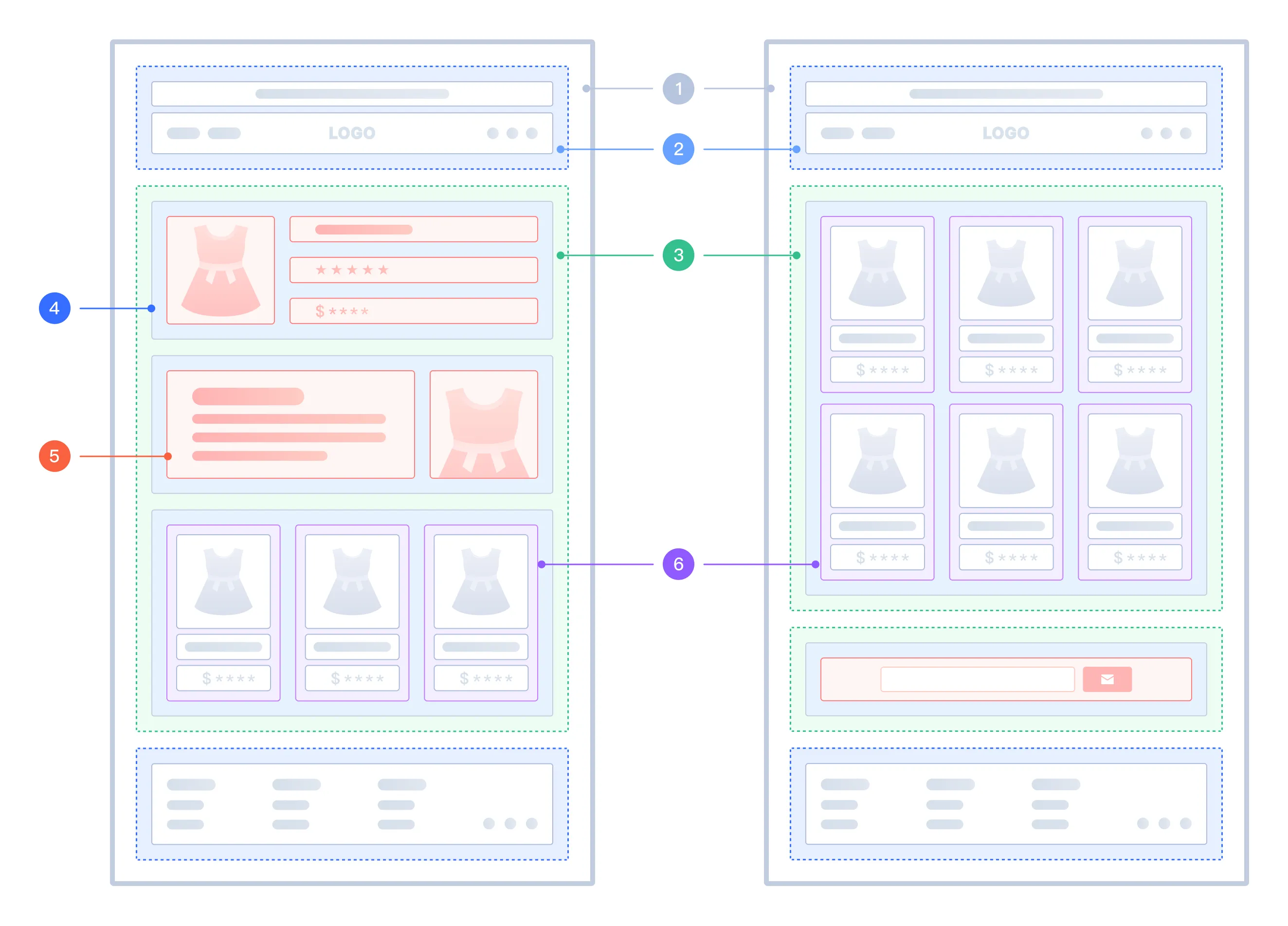
The following image shows the positions of different theme modules on a theme page.

<img src="https://s2cdn.myshopline.com/slfs/op-new/174728074991684/1741057935686-0aeec1be-bd5a-4551-8201-168ea4d44f32.png" alt="" />

<table>
  <colgroup>
    <col/>
    <col/>
    <col/>
  </colgroup>
  <tbody>
    <tr>
      <th>
        <p><strong>No.</strong></p>
      </th>
      <th>
        <p><strong>Theme module</strong></p>
      </th>
      <th>
        <p><strong>Description</strong></p>
      </th>
    </tr>
    <tr>
      <td colSpan="1" rowSpan="1">
        1
      </td>
      <td colSpan="1" rowSpan="1">
        layout
      </td>
      <td colSpan="1" rowSpan="1">
        The basic framework, defining reusable elements for different pages, such as the header and footer.
      </td>
    </tr>
    <tr>
      <td colSpan="1" rowSpan="1">
        2
      </td>
      <td colSpan="1" rowSpan="1">
        page template
      </td>
      <td colSpan="1" rowSpan="1">
        Defines the page layout and content, supporting the dynamic configuration of sections.
      </td>
    </tr>
    <tr>
      <td colSpan="1" rowSpan="1">
        3
      </td>
      <td colSpan="1" rowSpan="1">
        section group
      </td>
      <td colSpan="1" rowSpan="1">
        Used in layout files, supporting the dynamic configuration of sections, such as the noticeboard and menu.
      </td>
    </tr>
    <tr>
      <td colSpan="1" rowSpan="1">
        4
      </td>
      <td colSpan="1" rowSpan="1">
        section
      </td>
      <td colSpan="1" rowSpan="1">
        The independent and reusable section, supporting data configuration and dynamic addition in the page template and section groups.
      </td>
    </tr>
    <tr>
      <td colSpan="1" rowSpan="1">
        5
      </td>
      <td colSpan="1" rowSpan="1">
        section block
      </td>
      <td colSpan="1" rowSpan="1">
        The private reusable block in page sections, supporting data configuration. It can only be added, deleted, or similarly manipulated within the section it is defined.
      </td>
    </tr>
    <tr>
      <td colSpan="1" rowSpan="1">
        6
      </td>
      <td colSpan="1" rowSpan="1">
        global block
      </td>
      <td colSpan="1" rowSpan="1">
        The global public reusable block, supporting data configuration. It can be added, deleted, or similarly manipulated within any page section.
      </td>
    </tr>
  </tbody>
</table>