---
title: "sections"
doc_type: static
doc_category: static
doc_version: v20270301
source_url:
html: 'https://developer.shopline.com/docs/online-store-3-0-themes/theme-structure/sections'
md: 'https://developer.shopline.com/docs/online-store-3-0-themes/theme-structure/sections.md'
---
# sections
The `sections` directory contains all sections for a theme. A section is the core element for page construction, primarily used to define the structure and functions of different page modules. Merchants can freely add, delete, move, and edit sections in a theme.
---
## Directory structure{#A97VW}
Within the `sections` directory, each section must have its unique directory, containing an `.html` file with the same name as the directory. A section can consist of the following three types of files:
+ **`.html`** (required): Used to define the HTML layout of the section.
+ **`.css`** (optional): Used to define the styling of the section.
+ **`.js`** (optional): Used to define the interaction logic of the section.
```html
sections
├── announcement-bar
│ ├── announcement-bar.css
│ ├── announcement-bar.js
│ └── announcement-bar.html
├── blog
│ ├── blog.css
│ └── blog.html
```
---
## Create a section{#WXNLw}
The `.html` file of each section generally contains the following two parts:
+ **HTML**: defines the layout of the section.
+ **schema**: defines the configuration settings of the section. These settings display in the theme editor, allowing merchants to make custom configurations.
The following parts take the `featured-collection` as an example, showing the steps of creating a section.
### 1. Add section files{#HJTmF}
Create a new directory named `featured-collection` under the `sections` directory, and then create an `.html` file with the same name inside the new directory. The following shows the directory structure:
```html
sections
└── featured-collection
└── featured-collection.html
```
### 2. Define the schema configuration{#DJPP3}
Add the [schema](#Fc76g) in the `featured-collection.html` file.
```html
{{#schema}}
{
"name": "featured-collection",
"settings": [
{
"type": "collection",
"id": "collection",
"label": "collection"
}
]
}
{{/schema}}
```
### 3. Render the schema configuration{#suyui}
In the `.html` file, obtain the section configuration by specifying `section.settings`, and use the [collection control](https://developer.shopline.com/docs/online-store-3-0-themes/theme-and-editor-interaction/editor-controls.md#z3no3) to get the collection title selected by the merchant. The ID of the section setting is `collection`.
The configuration example is as follows:
```html
title: {{section.settings.collection.title}}
{{#schema}}
{
"name": "featured-collection",
"settings": [
{
"type": "collection",
"id": "collection",
"label": "collection"
}
]
}
{{/schema}}
```
The output is as follows:
```html
```
> **tip**
>
> The [schema](#Fc76g) declare component configurations. It cannot render any content.
---
## Create a private block in the section{#bt1G9}
[Blocks](https://developer.shopline.com/docs/online-store-3-0-themes/theme-structure/blocks.md) are supported within sections. You can segment a section's functionality into different blocks and assemble them in the section.
### 1. Add files of private blocks{#e85xs}
The private blocks for a section must be stored in the `blocks` directory within the section.
Create the private block directory `blocks` under the `sections/featured-collection` section, shown as follows:
```html
sections
└── featured-collection
├── featured-collection.html
└── blocks
├── heading.html # The title block
└── product-list.html # The product list block
```
### 2. Define the HTML layout for the block{#yyGBz}
In the `heading.html` block file, use the [props](https://developer.shopline.com/docs/sline/object/props.md) object to obtain the `text` field passed in the section.
> **tip**
>
> All fields in the `props` object are predefined parameters of the block and must be passed in externally. For example, the `text` field in the following sample must be provided when using the block. Otherwise, the block will fail to render properly.
```html
```
In the `product-list.html` file:
1. Use the [props](https://developer.shopline.com/docs/sline/object/props.md) object to obtain the `collection` field passed in the section.
2. Use the [get_product_pagination](https://developer.shopline.com/docs/sline/filter/get-product-pagination.md) filter to obtain the product pagination data.
3. Render the product content by using the [for](https://developer.shopline.com/docs/sline/tag/for.md) tag.
```html
{{#var products_pagination = props.collection | get_product_pagination(4) /}}
{{#var products = products_pagination.list /}}
{{#for product in products}}
-
{{product.title}}
{{/for}}
```
### 3. Render blocks{#FY4RN}
After creating blocks, you can reference them in the section.
+ Within the `div` element, use the [blocks](https://developer.shopline.com/docs/sline/tag/blocks.md) and [block](https://developer.shopline.com/docs/sline/tag/block.md) tags to render blocks.
+ Within the schema, add block-related fields.
```html
{{#blocks}}
{{#if forblock.type == "$heading"}}
{{#block text=section.settings.collection.title /}}
{{#else if forblock.type == "$product-list" /}}
{{#block collection=section.settings.collection/}}
{{/if}}
{{/blocks}}
{{#schema}}
{
"name": "featured-collection",
"settings": [
{
"type": "collection",
"id": "collection",
"label": "collection"
}
],
"blocks": [
{
"type": "$heading",
"limit": 1
},
{
"type": "$product-list",
"limit": 1
}
]
}
{{/schema}}
```
---
## Section group{#Imi1M}
A section group is a collection of related sections, used to manage the sections and their configurations that will render together. The section group is defined by `.json` files, which must be stored under the root directory `sections`. The directory structure example is as follows:
```html
sections
├── header-group.json
└── footer-group.json
```
### Schema{#CIjtm}
The following shows the JSON data specification of a section group:
```html
{
name: ,
type: ,
sections: {
: {
"type": ,
"disabled": ,
"settings": {
:
},
"blocks": {
: {
"type": ,
"settings": {
:
},
"blocks": {
: {
"type": ,
"settings": {
:
}
}
}
}
},
"block_order":
}
},
"order":
}
```
The following table explains the fields in the JSON data specification.
| **Field** | **Data type** | **Required or not** | **Description** |
| --- | --- | --- | --- |
| \ | String | Yes | The name of the section group |
| \ | String | Yes | The type of the section group. Valid values are:
• `header`: the section group applied to the page header
• `footer`: the section group applied to the page footer |
| \ | String | Yes | The global unique hash to identify a section, generated randomly. |
| \ | String | Yes | The section file name. |
| \ | Boolean | No | Whether to show or hide the section.
• `true`: hide
• `false`: show
Default value: `false` |
| \ | String | No | The global unique hash string to identify a block, generated randomly. |
| \ | String | No | The block file name. |
| \ | String[]| No | The list of ``, to identify the rendering order of blocks. |
| \ | String[] | No | The list of ``, to identify the rendering order of sections. |
| \ | String | No | The configuration ID, defined in the [schema](#Fc76g). |
| \ | String | No | The configuration value, customized by the merchant. |
The following example shows the schema in `header-group.json`.
```html
{
"name": "Header Group",
"type": "header",
"sections": {
"announcement-bar": {
"type": "announcement-bar",
"blocks": {
"announcement-bar__item1": {
"type": "$item"
}
},
"block_order": ["announcement-bar__item1"]
},
"header": {
"type": "header"
}
},
"order": ["announcement-bar", "header"]
}
```
### Using section groups{#Ciri0}
Use section groups through the [sections](https://developer.shopline.com/docs/sline/tag/sections.md) tag.
The following example shows how to reference the `header-group.json` section group within the `layout/theme.html` file.
```html
...
...
{{#sections "header-group" /}}
...
```
Merchants can add, delete, and reorder sections within the section group via the theme editor.
> **tip**
>
> Typically, the `sections` directory only includes `header-group.json` and `footer-group.json` files.
>
> • `header-group.json`: the section group applied to the page header
> • `footer-group.json`: the section group applied to the page footer
---
## Fixed sections{#WgpOI}
Fixed sections are part of the theme that merchants cannot add, delete, or rearrange through the theme editor, such as the page header and footer. Merchants can only modify settings of these sections.
The fixed sections must be included and referenced in the [layout](https://developer.shopline.com/docs/online-store-3-0-themes/theme-structure/layout.md) file.
### Using fixed sections{#HoVx0}
You can reference fixed sections in the layout file by using the [section](https://developer.shopline.com/docs/sline/tag/section.md) tag.
As shown in the following example, in the Bottle theme, fixed sections are referenced in the layout file for the password protection page.
```html
{{#content "header" /}}
{{#section "main-password-header" /}}
...
{{#content "layout" /}}
...
{{#section "main-password-footer" /}}
{{#content "footer" /}}
```
---
## Asynchronous section rendering{#ZuQ5j}
You can use the capability of asynchronous section rendering by sending AJAX requests to fetch specific section HTML snippets. These snippets can then be used to dynamically replace page elements and update the content without the need to reload the entire page.
For more details, refer to [Section rendering API](https://developer.shopline.com/docs/online-store-3-0-themes/section-rendering-api.md?lang=en).
---
## Section schema{#Fc76g}
Component utilize the schema to define various attributes of the section, such as the section name. The schema of a section includes the following attributes:
+ [name](#NxOfE)
+ [class](#EcWCY)
+ [tag](#Yui6z)
+ [settings](#ZFUPi)
+ [blocks](#OuEiB)
+ [max_blocks](#NUXtU)
+ [limit](#txqP3)
+ [presets](#D9BUi)
+ [icon](#PPOz9)
> **tip**
>
> The schema tag is a Sline tag. It cannot render any content.
### name{#NxOfE}
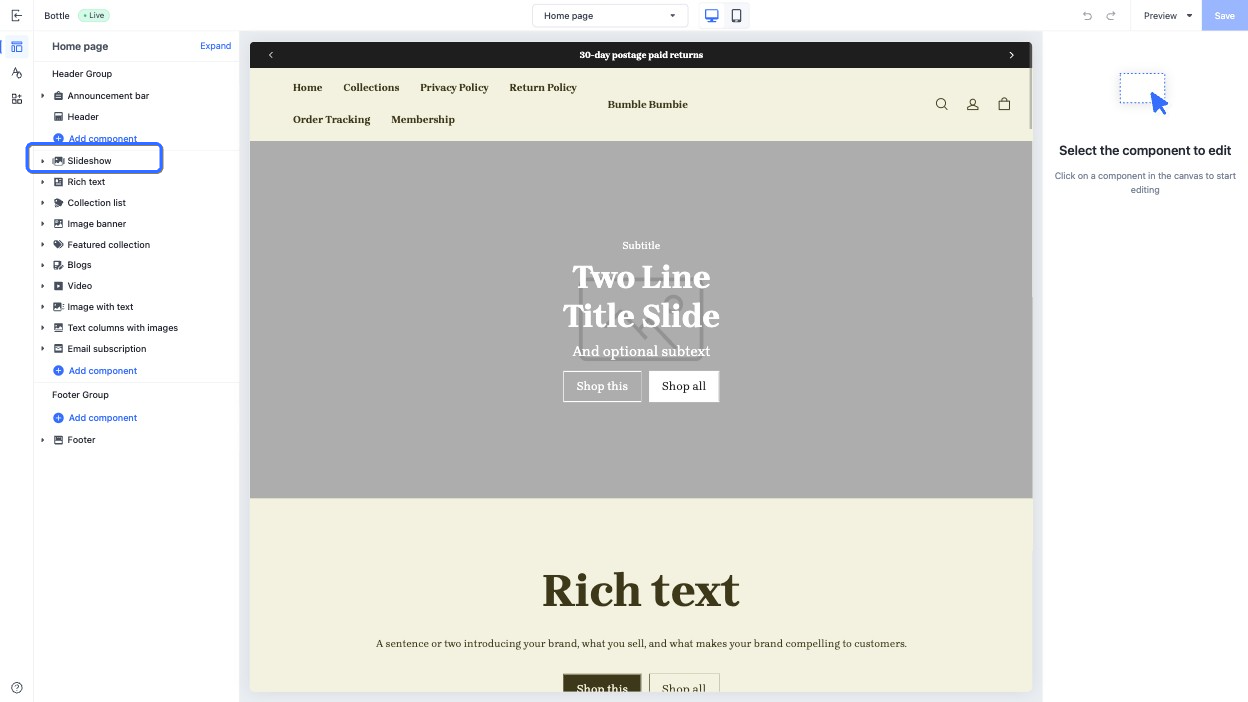
The `name` attribute defines the section title displayed in the theme editor.
The following example shows `name` specified in the schema.
```html
{{#schema}}
{
"name": "Slideshow"
}
{{/schema}}
```
The section title rendered in the theme editor is shown as follows:
### class{#EcWCY}
When you render a section in a theme page, the section is automatically wrapped in an HTML element with the default `shopline-section` class. You can append the class value by defining the `class` attribute in the section schema.
For example, the `class` attribute in a section is defined as follows:
```html
{{#schema}}
{
"name": "Slideshow",
"class": "slideshow"
}
{{/schema}}
```
Then the new HTML output is as follows, with the new class value of `shopline-section slideshow`.
```html
```
### tag{#Yui6z}
When you render a section in a theme page, the section is automatically wrapped in an HTML element, which defaults to `div`. You can change this HTML element using the `tag` attribute.For example, the `tag` attribute in a section is defined as follows:
```html
{{#schema}}
{
"name": "Slideshow",
"tag": "section"
}
{{/schema}}
```
Then the new HTML output is as follows, with the wrapper element changed to `section`.
```html
```
In a block schema, setting `tag` to an empty string removes the wrapper element. In this case, you must manually add the ` {{{ shopline_attributes }}} ` attribute to provide location context for the theme editor. If the wrapper is not removed, this attribute is injected automatically. For example:
```html
{{#schema}}
{
"name": "Slideshow-item-block",
"tag": ""
}
{{/schema}}
```
### settings{#ZFUPi}
> **tip**
>
> For detailed information about `settings`, refer to [Control configurations](https://developer.shopline.com/docs/online-store-3-0-themes/theme-and-editor-interaction/editor-controls.md).
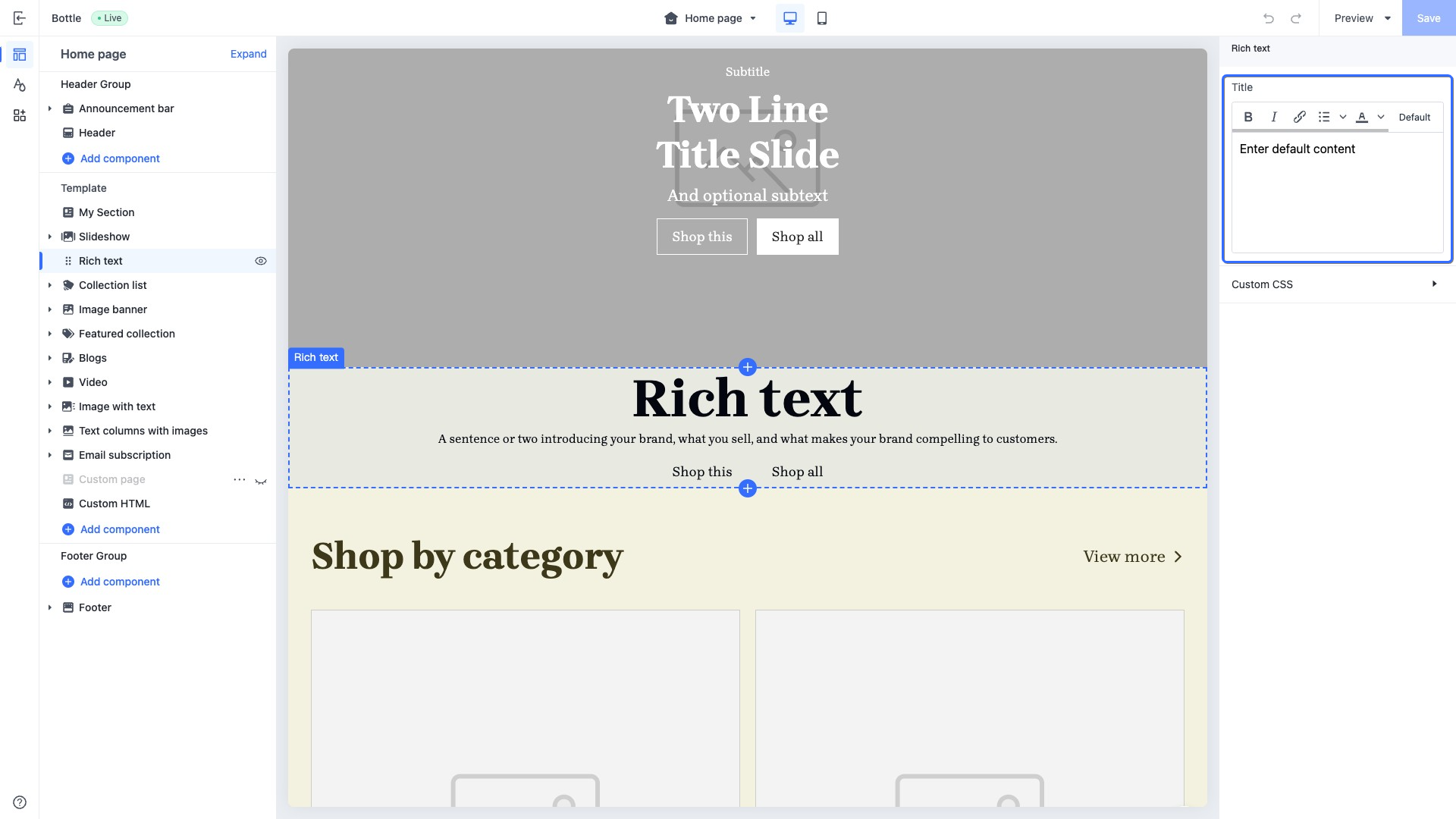
You can create section configuration settings for merchants to customize the section in the theme editor.
> **caution**
>
> Each `id` in `settings` must be unique within the section.
```html
{{#schema}}
{
"name": "Richtext",
"settings": [
{
"type": "richtext",
"id": "title",
"label": "Title",
"default": "Rich text"
}
]
}
{{/schema}}
```
#### Access configuration settings{#dQb9k}
You can access configuration settings for the section via [section.settings](https://developer.shopline.com/docs/sline/object/section.md).
```html
{{ section.settings.title }}
{{#schema}}
{
"name": "Slideshow",
"settings": [
{
"type": "richtext",
"id": "title",
"label": "Title",
"default": "Rich text"
}
]
}
{{/schema}}
```
### blocks{#OuEiB}
You can create reusable blocks for a section. The blocks can be added, deleted, and reordered in a section.
`blocks` contains a list of blocks, with the following attributes:
| **Attribute** | **Data type** | **Required or not** | **Description** |
| --- | --- | --- | --- |
| type | string | Yes | The block type. The value of this attribute varies depending on the type of the block:
• **Public** **block**: The value is the HTML file name of the block. For example, if the file name of the public block is `blocks/heading.html`, the `type` value is `heading`.
• **Private** **block**: The value is the HTML file name of the block, prefixed with the symbol `$`. For example, if the file name of the public block is `sections/blog/blocks/articles.html`, the `type` value is `$articles`.
• [App Block](https://developer.shopline.com/docs/online-store-3-0-themes/integrate-apps-with-themes/theme-app-extension/structure.md?lang=en#KOCjB): The value is fixed at `@app`, indicating that the block supports adding an App Block. |
| limit | number | No | The quantity of this type of block that can be used. |
```html
{{#schema}}
{
"name": "Slideshow",
"blocks": [
{
"type": "heading-with-link/heading-with-link",
"limit": 1
},
{
"type": "product-list/list",
"limit": 1
}
]
}
{{/schema}}
```
### max_blocks{#NUXtU}
The `max_blocks` attribute indicates the maximum quantity of blocks that a merchant can use in the section via the theme editor. The following shows an example:
```html
{{#schema}}
{
"name": "Slideshow",
"max_blocks": 5
}
{{/schema}}
```
### limit{#txqP3}
The `limit` attribute restricts the maximum number of times a specific section type or block can be added. When configured within the component's root schema, it defines the maximum number of instances this section can have within a single page template. For example:
```html
{{#schema}}
{
"name": "description",
"limit": 1
}
{{/schema}}
```
The configuration above indicates that this component can be added at most once within the same page template. Similarly, the limit attribute can be applied within blocks to restrict the maximum number of times a specific block type can be added inside the current section. For example:
```html
{{#schema}}
{
"name": "content-container",
"blocks": [
{
"type": "$heading",
"limit": 1
},
{
"type": "$subheading",
"limit": 1
}
]
}
{{/schema}}
```
The configuration above indicates that within this section, you can add a maximum of one `$heading` block and a maximum of one `$subheading` block.
### presets{#D9BUi}
The `presets` attribute is used to define the display of the section's preset configurations when the section is added through the theme editor.
This attribute is an array, where the number of elements in the array represents the number of preset configurations available for the section. Each section must contain at least one preset configuration.
When a merchant adds a section in the theme editor, the preset configuration of the selected section is added to the corresponding JSON Template.
> **caution**
>
> If the `presets` attribute is not explicitly declared, the section cannot be displayed in the theme editor.
Each item in `presets` has the following attributes:
| **Attribute** | **Description** | **Required or not** |
| --- | --- | --- |
| name | The preset name, displayed as the section name in the theme editor. | Yes |
| settings | The preset settings, stored as an object. | No |
| category | The preset category, displayed as the section category when merchants add the section in the theme editor. | No |
| blocks | A predefined set of blocks with specific configurations, automatically included when merchants add the section in the theme editor.
Each block is characterized by the following fields:
• `type`: The name of the block's HTML file, such as `heading.html`.
• `settings`: The block's predefined settings, same as section preset `settings`. | Yes
|
The following shows a `presets` example in a section.
```html
{{#schema}}
{
"name": "Slideshow",
"settings": [
{
"type": "text",
"id": "title",
"label": "Title"
}
],
"presets": [
{
"name": "Image slideshow",
"settings": {
"title": "Image"
},
"blocks": [
{
"type": "$image",
"settings": {
"text": "image item"
}
}
]
}
]
}
{{/schema}}
```
### icon{#PPOz9}
The `icon` attribute is used to display the section icon in the drag-and-drop zone in the theme editor. Valid values are as follows:
| **Value** | **Icon to display** |
| --- | --- |
| footer |  |
| header |  |
| testimonials |  |
| orderPlacement |  |
| products | |
| collection |  |
| collectionList |  |
| productThumbnail |  |
| filter |  |
| featuredProduct |  |
| productHighlightWithCover |  |
| content |  |
| image |  |
| slideshow |  |
| heroImageWithTextBox |  |
| textWithImage |  |
| textColumnsWithIcons |  |
| video |  |
| logoList |  |
| imageTextGrid |  |
| timeline |  |
| campaignPromotion |  |
| footerPromotion |  |
| announcementBar |  |
| discountBanner |  |
| email |  |
| navigation |  |
| frequentlyAskedQuestions |  |
| code |  |
| brandList |  |
| sideColumnFilter |  |
| socialMedia |  |
| sideColumn |  |
| inquiryForm |  |
| externalLink |  |
| generalSection |  |
| company |  |
| marketSelector |  |
| cardComponent |  |
| blog |  |
| title |  |
| button |  |
| general |  |
| checkoutPage |  |
| homePage |  |
| additionalPages |  |
| shoppingCart |  |
| loyaltyPoints |  |
| toggleSwitch |  |
| starRating |  |
| date |  |
| measurement |  |
| dataReference |  |
| colorPicker |  |
| fileUpload |  |
| number |  |
| addCustomField |  |
| linkCustomField |  |
| customer |  |
| currency |  |
| productSku |  |
| vector |  |
| addButton |  |
| divider |  |
| socialMedia |  |
| gallery |  |
| discountTag |  |
| orderNotes |  |
| addToCart |  |
| abandonedCart |  |
| favoriteStar |  |
| storeIcon |  |
| groupIcon |  |
| dropdownSelect |  |
| upgradeOption |  |
| cartTotal |  |
| giftCard |  |
| userLevel |  |
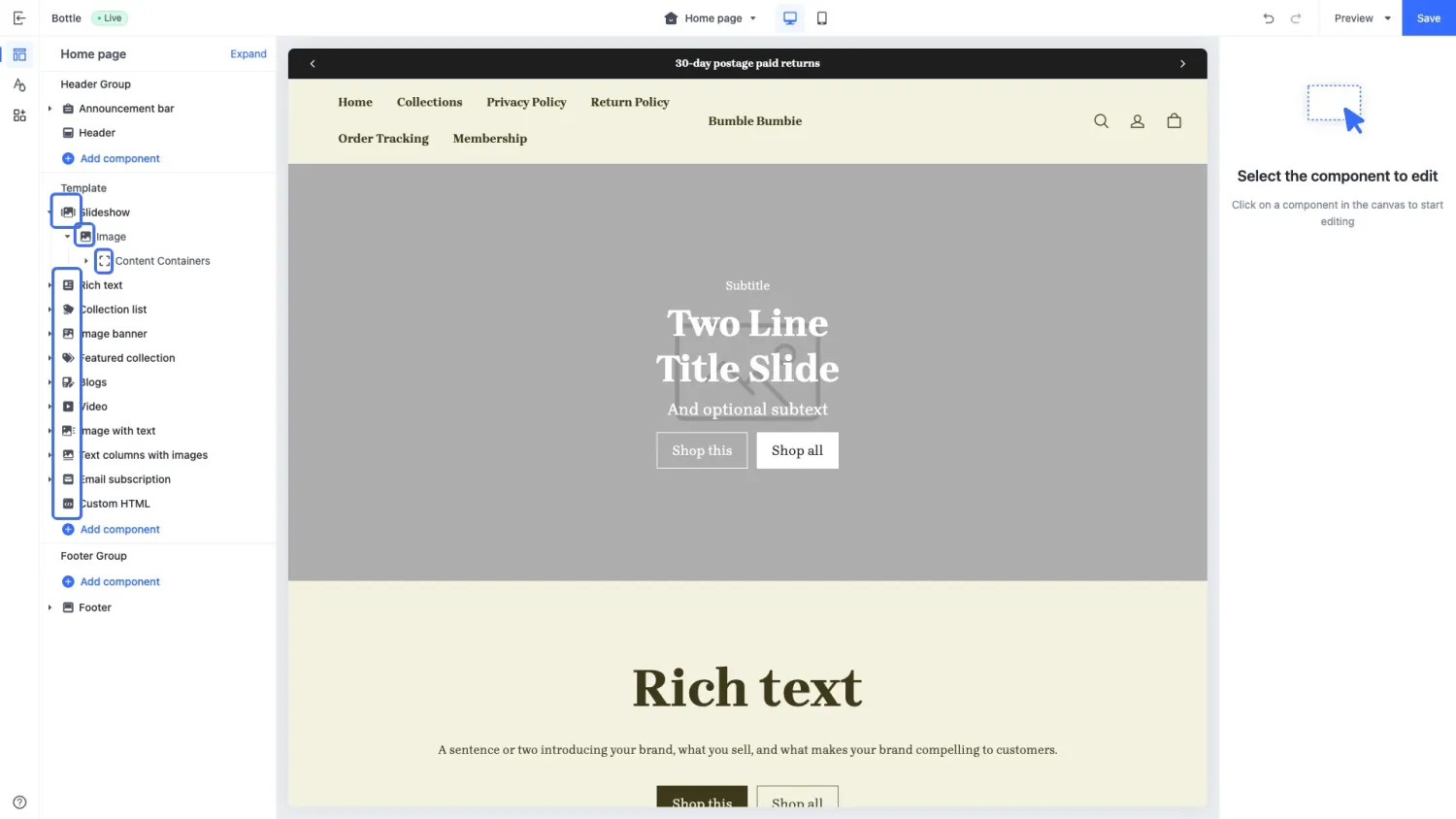
The following example shows how icons are displayed in the theme editor.