---
title: "theme.schema.json"

doc_type: static
doc_category: static
doc_version: v20270301
source_url:
  html: 'https://developer.shopline.com/docs/online-store-3-0-themes/theme-structure/theme-schema-json'
  md: 'https://developer.shopline.com/docs/online-store-3-0-themes/theme-structure/theme-schema-json.md'
---
# theme.schema.json

`theme.schema.json` is the file for theme information and global configuration definitions. It is placed in the root directory of the project, and used to define:

-   **Theme information**: includes the name, version, author, supported links, and so on.
    
-   **Global configurations**: include form elements such as colors and fonts, which merchants can edit in the theme editor.
    

* * *

## Theme information definitions{#AgALW}

The basic information about the theme includes the theme name, version number, author, and so on. This information will be used in the official [Theme shop](https://themes.shopline.com/themes/Twig/styles/Default?clientLang=en), theme editor, [SHOPLINE Admin](https://admin.myshopline.com/), and so on, to help merchants better understand the theme.

### Data structure{#JtAWY}

The following example shows the [Bottle theme](https://developer.shopline.com/docs/online-store-3-0-themes/bottle.md?lang=en) information.

```json
// theme.schema.json 

{
  "theme_name": "Bottle",  														// Theme name
  "theme_version": "1.0.0",  													// Theme version
  "theme_author": "SHOPLINE",  												// Theme author
  "theme_documentation_url": "https://themes.shopline.com/themes/Bottle/styles/Default",                                               // Theme introduction URL
  "theme_support_url": "https://help.shopline.com/",  // SHOPLINE Help Center URL
  "theme_type_version": "OS_3.0",  										// Rendering engine version
  "schemas": [...]
}
```

### Field description{#Q12Qx}

<table>
  <colgroup>
    <col/>
    <col/>
    <col/>
  </colgroup>
  <tbody>
    <tr>
      <th>
        <p><strong>Field</strong></p>
      </th>
      <th>
        <p><strong>Description</strong></p>
      </th>
      <th>
        <p><strong>Example</strong></p>
      </th>
    </tr>
    <tr>
      <td colSpan="1" rowSpan="1">
        theme\_name
      </td>
      <td colSpan="1" rowSpan="1">
        The theme name
      </td>
      <td colSpan="1" rowSpan="1">
        `Bottle`
      </td>
    </tr>
    <tr>
      <td colSpan="1" rowSpan="1">
        theme\_version
      </td>
      <td colSpan="1" rowSpan="1">
        The theme version
      </td>
      <td colSpan="1" rowSpan="1">
        `1.0.0`
      </td>
    </tr>
    <tr>
      <td colSpan="1" rowSpan="1">
        theme\_author
      </td>
      <td colSpan="1" rowSpan="1">
        The theme author
      </td>
      <td colSpan="1" rowSpan="1">
        `SHOPLINE`
      </td>
    </tr>
    <tr>
      <td colSpan="1" rowSpan="1">
        theme\_documentation\_url
      </td>
      <td colSpan="1" rowSpan="1">
        The theme introduction document URL
      </td>
      <td colSpan="1" rowSpan="1">
        `https://themes.shopline.com/themes/Bottle/styles/Default`
      </td>
    </tr>
    <tr>
      <td colSpan="1" rowSpan="1">
        theme\_support\_url
      </td>
      <td colSpan="1" rowSpan="1">
        SHOPLINE Help Center URL
      </td>
      <td colSpan="1" rowSpan="1">
        `https://help.shopline.com/`
      </td>
    </tr>
    <tr>
      <td colSpan="1" rowSpan="1">
        theme\_type\_version
      </td>
      <td colSpan="1" rowSpan="1">
        The rendering engine version
      </td>
      <td colSpan="1" rowSpan="1">
        `OS\_3.0`
      </td>
    </tr>
  </tbody>
</table>

* * *

## Global configuration definitions{#UtT0k}

The global configuration defines common settings across the theme, which include, but are not limited to, the following scenarios:

-   **Font**: Defines the fonts applied to all pages.
    
-   **Input box**: Defines the style of input boxes on all pages.
    
-   **Add-to-cart method**: Defines the interaction method for all add-to-cart actions.
    

All templates, sections, and blocks can access global configuration data via the [settings](https://developer.shopline.com/docs/sline/object/settings.md) object.

### Data structure{#Y0Sof}

The following example shows a part of the global configuration definitions for the [Bottle theme](https://developer.shopline.com/docs/online-store-3-0-themes/bottle.md?lang=en), which are stored in the `schemas` field.

```json
// theme.schema.json

{
  ...
  "schemas": [  								// Configuration collection
    {
      "name": "Color",  				// Configuration category name
      "settings": [  						// Setting list for the configuration
        {
          "type": "color",  		// Control type for the configuration
          "label": "Sale",  		// Label for the configuration
          "id": "color_sale",  	// Unique identifier for the configuration
          "default": "#3D3819"  // Default value for the configuration
        }
      ]
    },
    {
      "name": "Font",
      "settings": [
        {
          "type": "font",
          "label": "Font",
          "id": "title_font",
          "default": "Brygada 1918:700"
        }
      ]
    }
  ]
}
```

### Field description{#I2F9R}

<table>
  <colgroup>
    <col/>
    <col/>
    <col/>
  </colgroup>
  <tbody>
    <tr>
      <th>
        <p><strong>Field</strong></p>
      </th>
      <th>
        <p><strong>Description</strong></p>
      </th>
      <th>
        <p><strong>Example</strong></p>
      </th>
    </tr>
    <tr>
      <td colSpan="1" rowSpan="1">
        schemas
      </td>
      <td colSpan="1" rowSpan="1">
        The collection of configurations
      </td>
      <td colSpan="1" rowSpan="1">
        Refer to [Data structure](#Y0Sof)
      </td>
    </tr>
    <tr>
      <td colSpan="1" rowSpan="1">
        name
      </td>
      <td colSpan="1" rowSpan="1">
        The configuration category name
      </td>
      <td colSpan="1" rowSpan="1">
        `Color`
      </td>
    </tr>
    <tr>
      <td colSpan="1" rowSpan="1">
        settings
      </td>
      <td colSpan="1" rowSpan="1">
        The setting list for the configuration
      </td>
      <td colSpan="1" rowSpan="1">
        Refer to [Data structure](#Y0Sof)
      </td>
    </tr>
    <tr>
      <td colSpan="1" rowSpan="1">
        type
      </td>
      <td colSpan="1" rowSpan="1">
        The type of [the configuration control](https://developer.shopline.com/docs/online-store-3-0-themes/theme-and-editor-interaction/editor-controls.md), such as a color or font
      </td>
      <td colSpan="1" rowSpan="1">
        `color`
      </td>
    </tr>
    <tr>
      <td colSpan="1" rowSpan="1">
        label
      </td>
      <td colSpan="1" rowSpan="1">
        The label for the configuration
      </td>
      <td colSpan="1" rowSpan="1">
        `Sale`
      </td>
    </tr>
    <tr>
      <td colSpan="1" rowSpan="1">
        id
      </td>
      <td colSpan="1" rowSpan="1">
        The unique identifier for the configuration
      </td>
      <td colSpan="1" rowSpan="1">
        `color\_sale`
      </td>
    </tr>
    <tr>
      <td colSpan="1" rowSpan="1">
        default
      </td>
      <td colSpan="1" rowSpan="1">
        The default value for the configuration
      </td>
      <td colSpan="1" rowSpan="1">
        `#3D3819`
      </td>
    </tr>
  </tbody>
</table>

### Use case examples{#iqYH7}

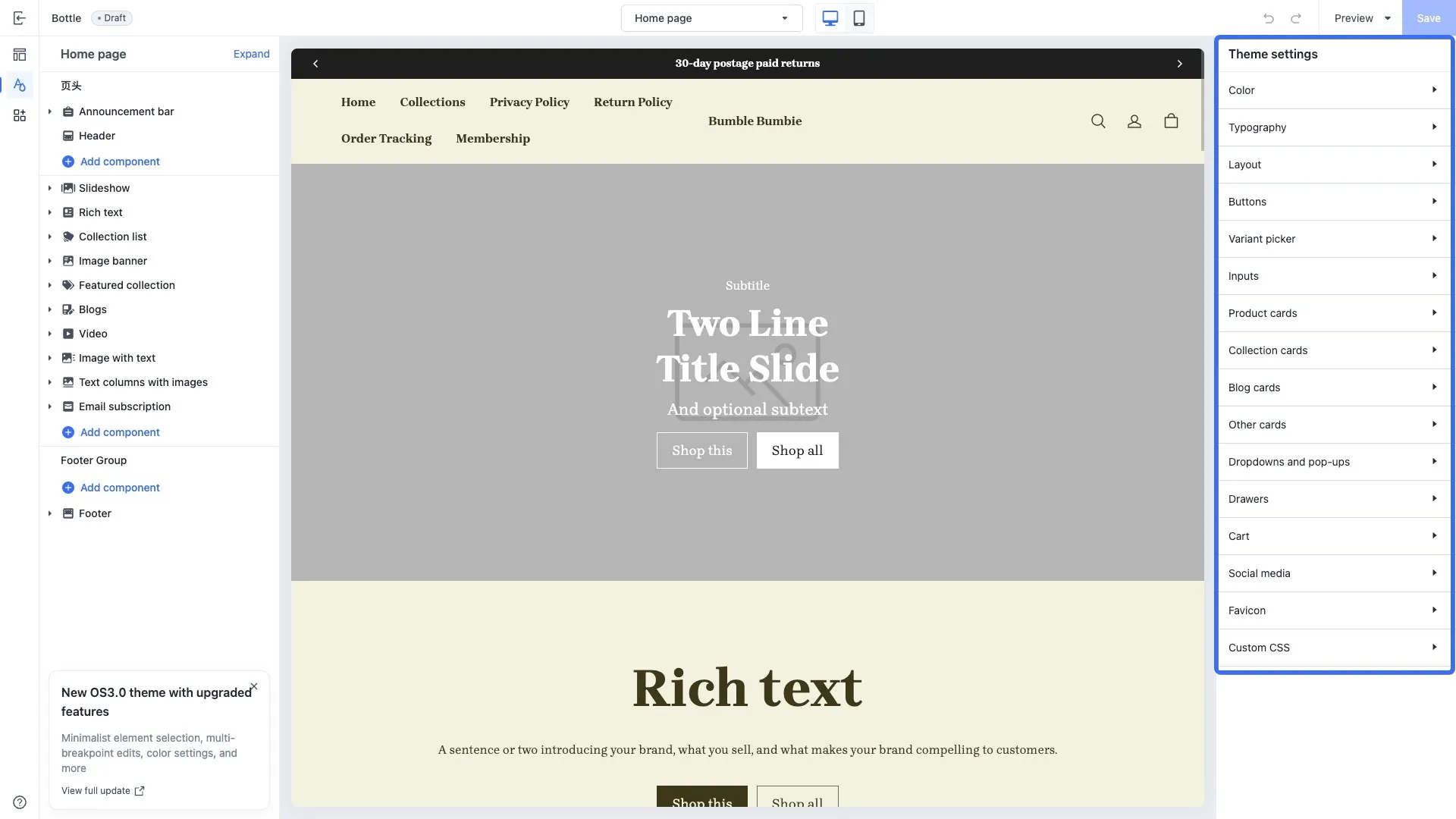
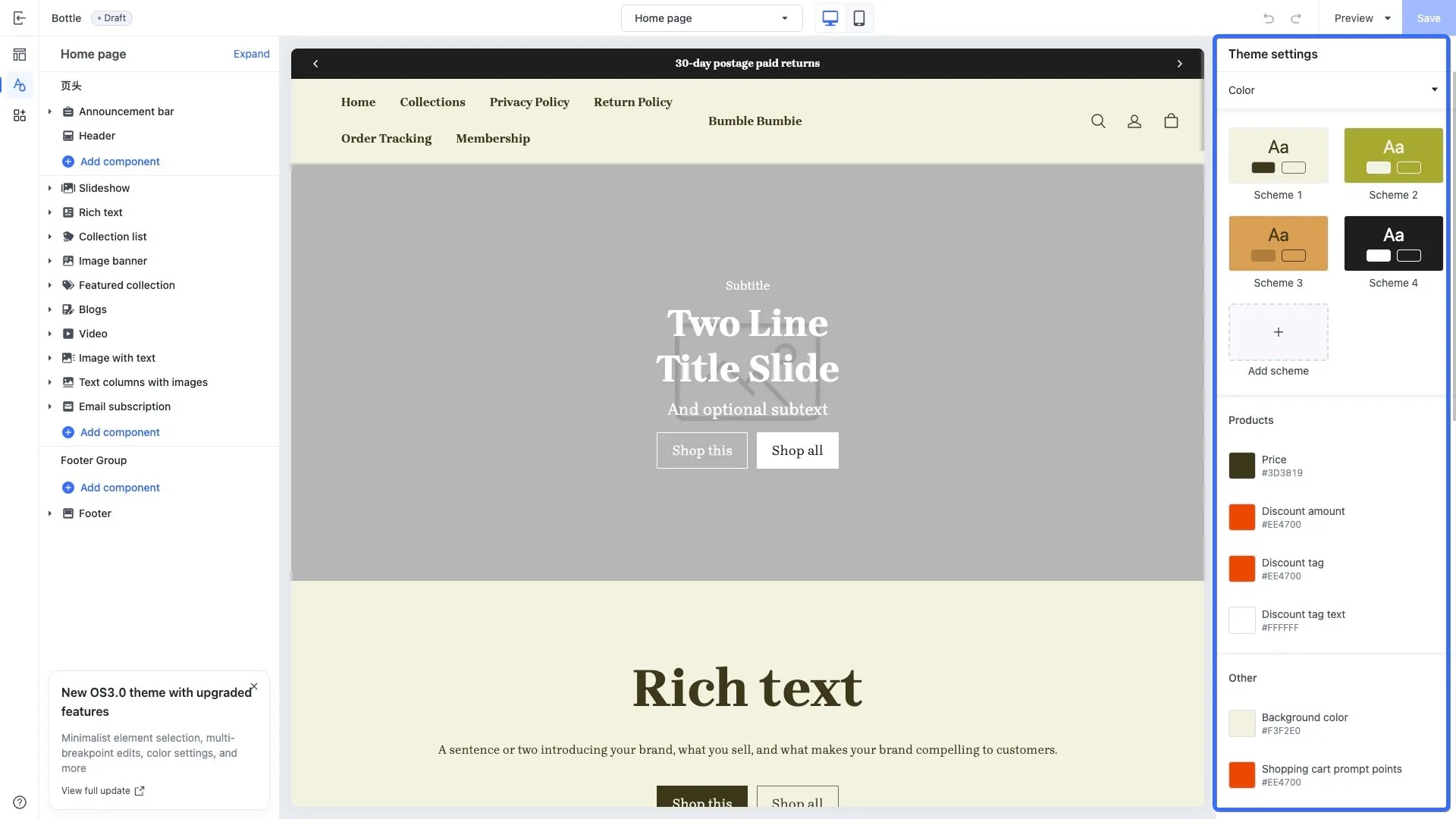
The following images show an example of how the global configurations of the Bottle theme are displayed in the theme editor.

<img src="https://s2cdn.myshopline.com/slfs/op-new/174721517733918/1744016436819-11048364-b33e-45d9-8afc-5b05cecccd96.png" alt="" /><img src="https://s2cdn.myshopline.com/slfs/op-new/174721519232473/1744016443231-f1feae38-ea87-4fd1-a02c-12c32bccadaa.png" alt="" />