---
title: "DigiCert 根证书升级指南"
doc_type: static
doc_category: static
doc_version: v20270301
source_url:
html: 'https://developer.shopline.com/zh-hans-cn/docs/apps/security-compliance/digi-cert-root-certificate-upgrade-guide'
md: 'https://developer.shopline.com/zh-hans-cn/docs/apps/security-compliance/digi-cert-root-certificate-upgrade-guide.md'
---
# DigiCert 根证书升级指南
本指南旨在帮助你正确安装和配置 DigiCert Global Root G2 根证书,以确保系统或应用能够正确识别由该根证书签发的 SSL/TLS 证书。
## 1.兼容性检查
DigiCert Global Root G2 根证书已在主流操作系统和运行环境中获得广泛支持,最低兼容版本如下:
| **根证书名称** | **根证书序列号** | **Windows** | **Mac OS** | **Android** | **iOS** | **Mozilla** | **Java** |
| --- | --- | --- | --- | --- | --- | --- | --- |
| [DigiCert Global Root G2](https://knowledge.digicert.com/general-information/compatibility-of-digicert-trusted-root-certificates) | 03:3A:F1:E6:A7:11:A9:A0:BB:28:64:B1:1D:09:FA:E5 | Windows XP SP3+ | Mac OS X 10.10+ | Android 5.0+ | iOS 7.0+ | Firefox 32+
NSS 3.16.3 | JRE1.8.0_131+ |
若你使用的环境出现证书信任问题,需按如下步骤升级根证书。
## 2.下载根证书
选择系统对应的根证书格式进行下载:
+ **Windows 系统**:下载 [DER/CRT](https://cacerts.digicert.com/DigiCertGlobalRootG2.crt) 格式
+ **Linux 或 macOS 系统**:下载 [PEM ](https://cacerts.digicert.com/DigiCertGlobalRootG2.crt.pem)格式
有关 DigiCert Global Root G2 的详细信息,可访问 [DigiCert 官网](https://knowledge.digicert.com/general-information/digicert-trusted-root-authority-certificates) 查看。
## 3.升级根证书
### 按操作系统升级
#### Linux 系统
系统信任根证书的保存位置因操作系统发行版不同有所差异。通常根证书保存在 `/etc/ssl/certs/` 目录下,或存放在 `/etc/pki/tls/certs/ca-bundle.crt` 文件中。
+ CentOS
```plain
# 安装证书管理工具
yum install -y ca-certificates && update-ca-trust
# 复制根证书
cp DigiCertGlobalRootG2.crt.pem /etc/pki/ca-trust/source/anchors/DigiCertGlobalRootG2.crt
# 更新证书
update-ca-trust extract
# 验证安装
grep -inr 'pLiaWN0bfVKfjllDiIGknibVb63dDcY3fe0Dkhvld1927jyNxF1WW6LZZm6zNTfl' /etc/pki/
```
+ Ubuntu/Debian
```plain
# 安装证书管理工具
apt-get install -y ca-certificates
# 复制根证书
cp DigiCertGlobalRootG2.crt.pem /usr/local/share/ca-certificates/DigiCertGlobalRootG2.crt
# 更新证书
update-ca-certificates
# 验证安装
grep -inr 'pLiaWN0bfVKfjllDiIGknibVb63dDcY3fe0Dkhvld1927jyNxF1WW6LZZm6zNTfl' /etc/ssl/certs/
```
+ Alpine 系统
```plain
# 安装证书管理工具
apk add --no-cache ca-certificates
# 复制根证书
cp DigiCertGlobalRootG2.crt.pem /usr/local/share/ca-certificates/DigiCertGlobalRootG2.crt
# 更新证书
update-ca-certificates
# 验证安装
grep -inr 'pLiaWN0bfVKfjllDiIGknibVb63dDcY3fe0Dkhvld1927jyNxF1WW6LZZm6zNTfl' /etc/ssl/certs/
```
#### Windows 系统
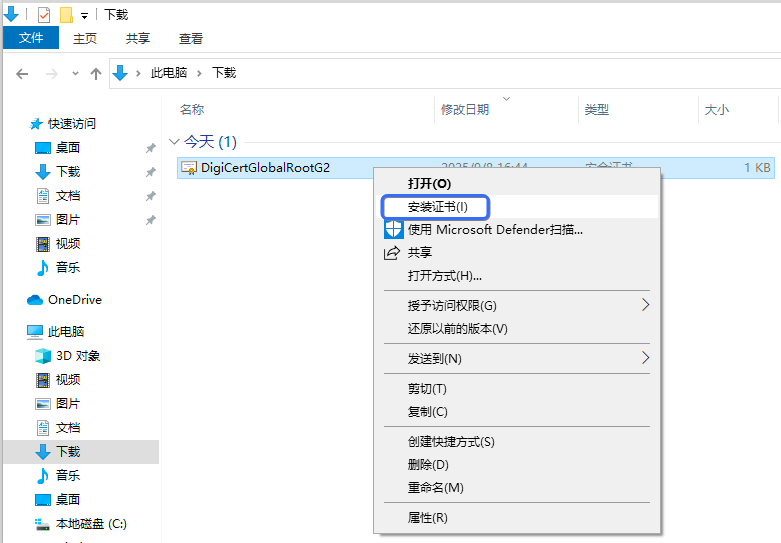
1. 安装`DigiCertGlobalRootG2.crt`根证书。
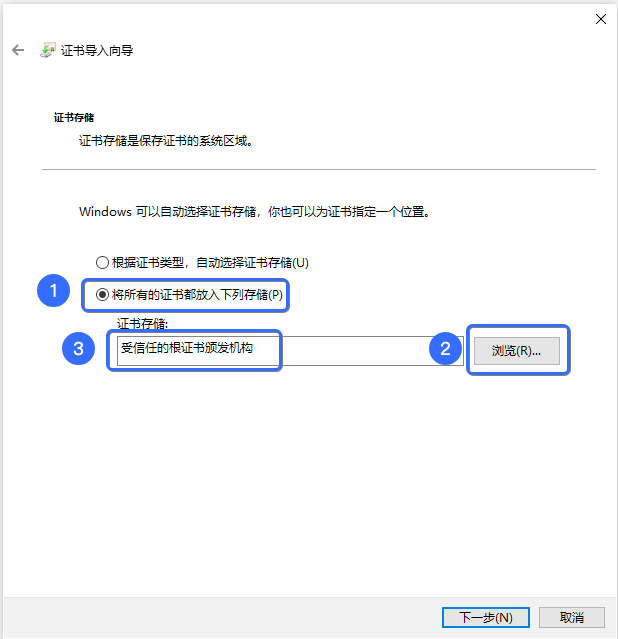
2. 选择**受信任的根证书颁发机构**。
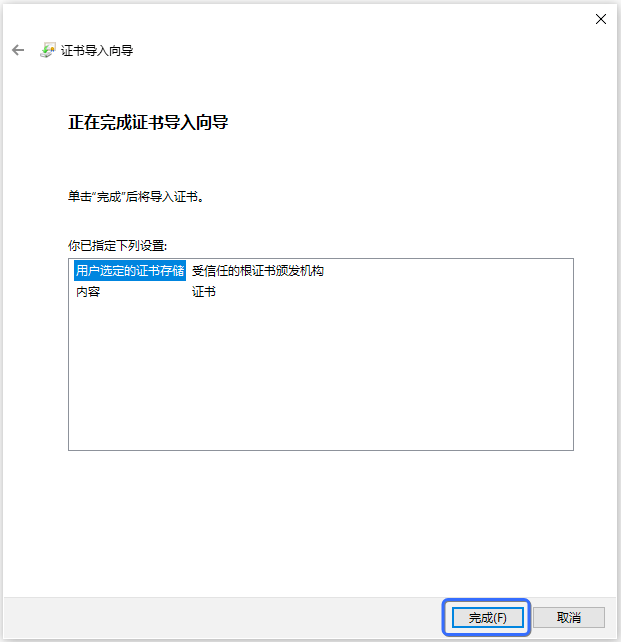
3. 点击**完成**,导入成功。
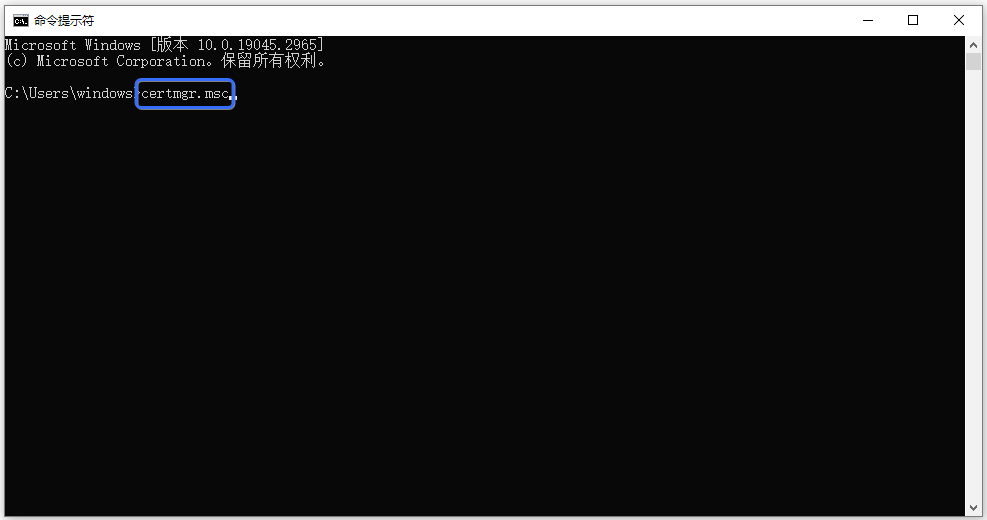
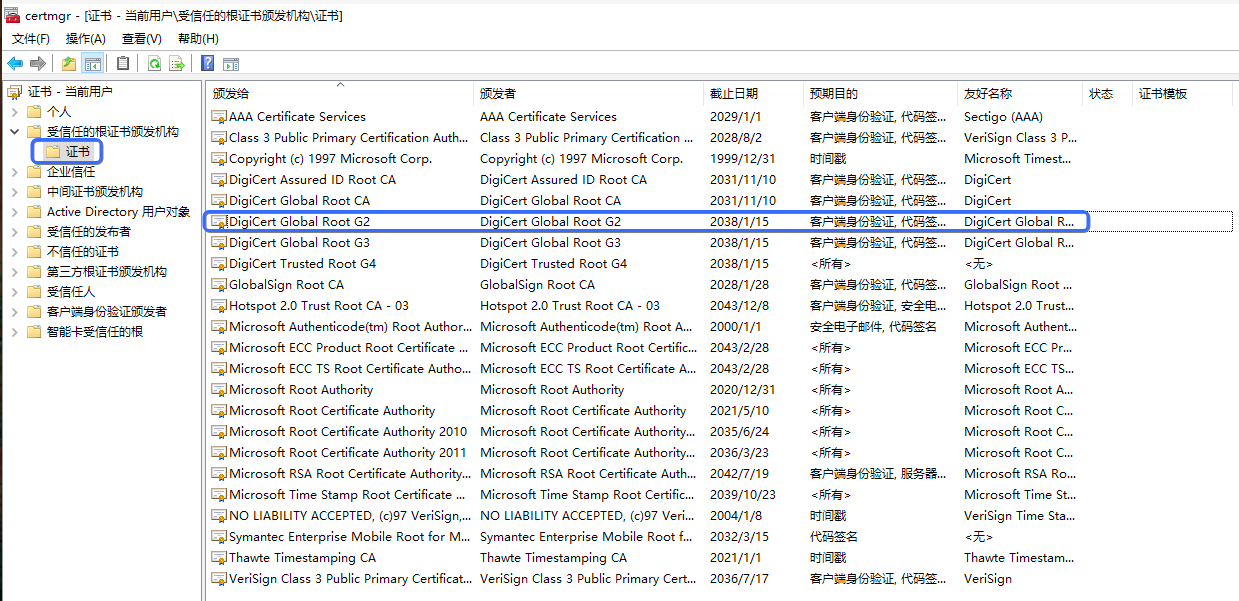
4. 打开 CMD 命令行输入 `certmgr.msc` 打开管理证书。
5. 在受信任的根证书颁发机构,能找到 **DigiCert Global Root G2** 证书,则说明安装成功。
#### macOS 系统
##### 方法一:图形界面安装
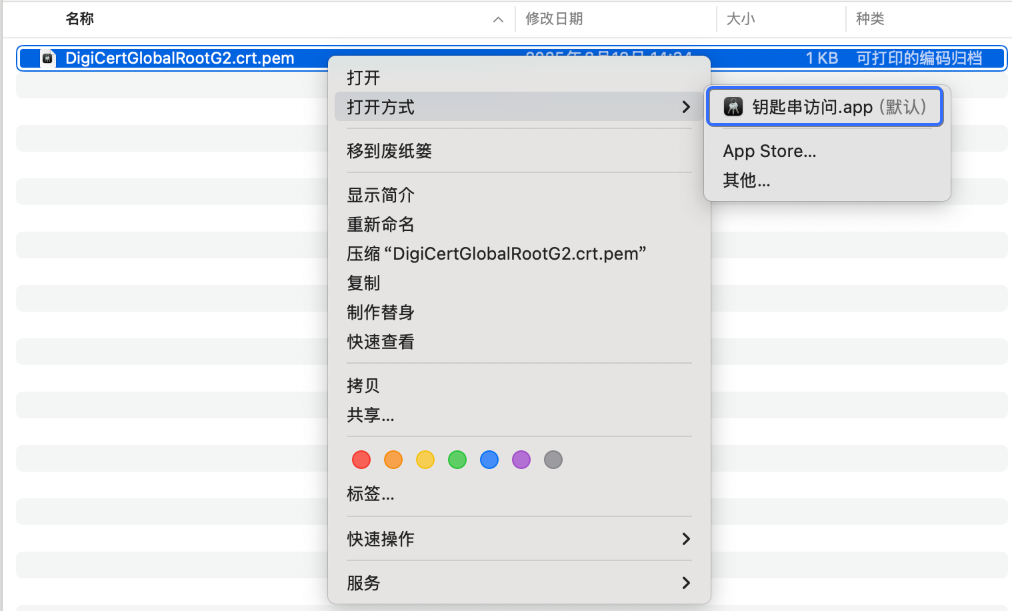
1. 打开`DigiCertGlobalRootG2.crt.pem`根证书。
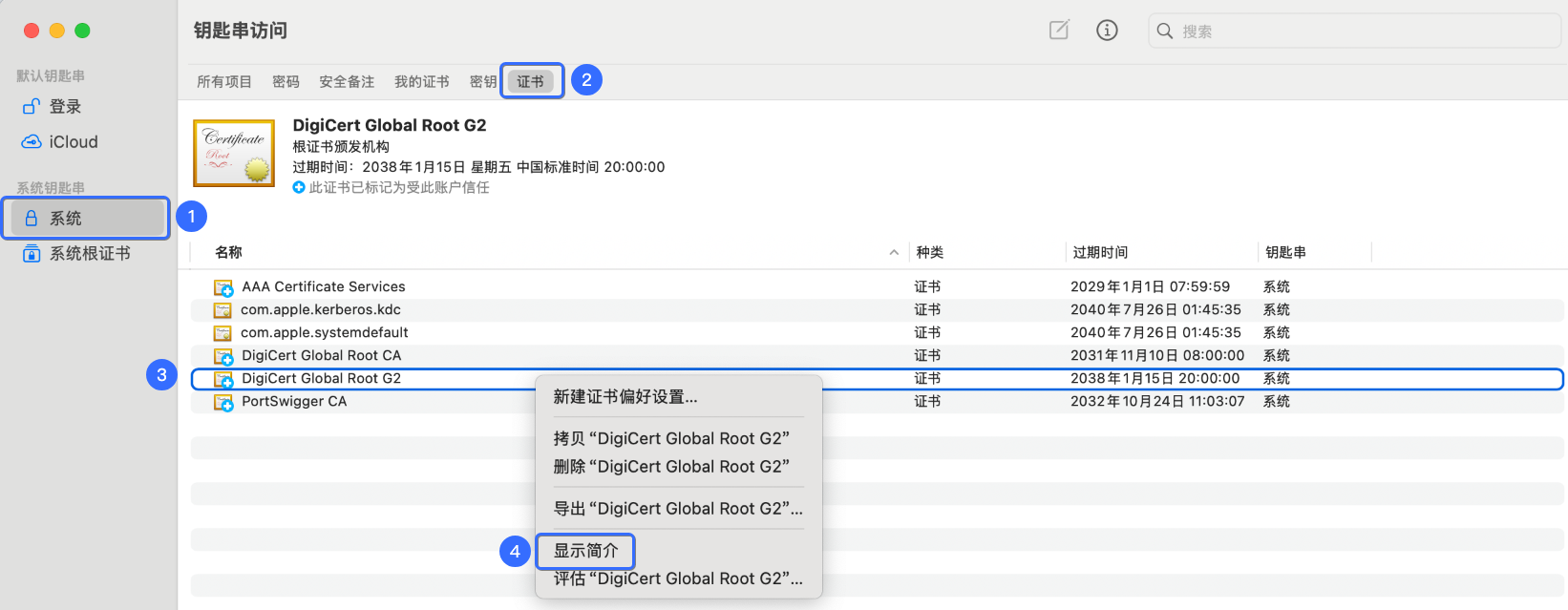
2. 在 **钥匙串访问** 找到证书,并在 **显示简介** 打开证书。
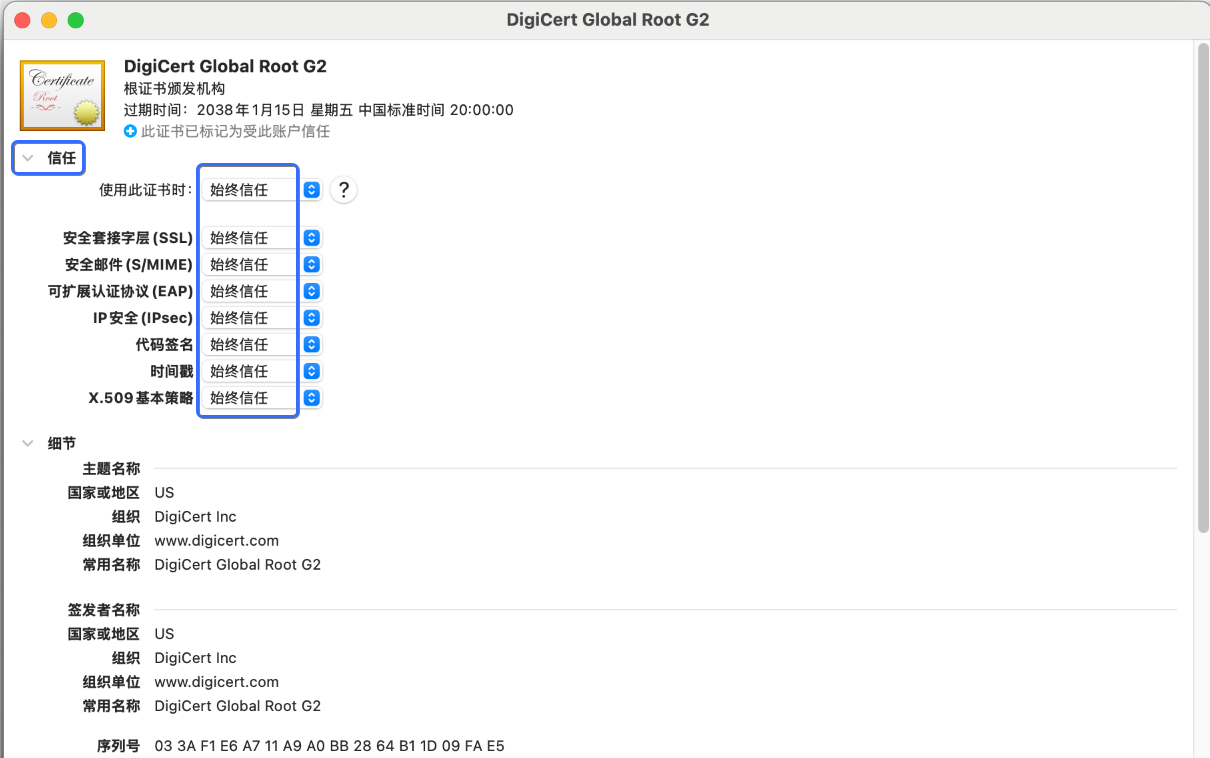
3. 把证书信任设置为**始终信任**。
##### 方法二:Homebrew 安装的 curl/openssl
```plain
# 追加证书到根证书信任文件
cat DigiCertGlobalRootG2.crt.pem >> /usr/local/etc/ca-certificates/cert.pem
# 验证证书
grep -in 'pLiaWN0bfVKfjllDiIGknibVb63dDcY3fe0Dkhvld1927jyNxF1WW6LZZm6zNTfl' /usr/local/etc/ca-certificates/cert.pem
```
### 按开发环境方式升级
#### JAVA
##### 方法一:手动导入到 cacerts
使用 keytool 命令行升级根证书。`DigiCertGlobalRootG2.crt.pem` 是 PEM 格式的根证书文件,`DigiCertGlobalRootG2` 是根证书的别名。
```plain
keytool -keystore $JAVA_HOME$/lib/security/cacerts -importcert -alias DigiCertGlobalRootG2 -file DigiCertGlobalRootG2.crt.pem
```
##### 方法二:升级 JDK
如果使用的 JDK 版本较低(例如 JDK1.6 或 1.7),建议升级到 JDK8 或更高版本。
#### PHP
PHP 代码中可指定根证书路径:
```plain
curl_setopt(pCurl, CURLOPT_CAINFO, "./DigiCertGlobalRootG2.pem ");
```
#### Python
使用 Python 发起请求,出现类似 `SSL: CERTIFICATE_VERIFY_FAILED` 错误信息说明不兼容,需要升级根证书。
+ 如果 Python 默认使用系统 ssl(OpenSSL)模块的信任根证书,参考 [按操作系统升级](#dJtWr) 来更新根证书。
+ 如果你想自主管理根证书库,参考 [Python 2.7 ssl 文档](https://docs.python.org/2.7/library/ssl.html) 或 [Python 3 ssl 文档](https://docs.python.org/3/library/ssl.html)。
## 4.验证升级
为验证根证书是否升级成功,你可以使用以下任意一种或多种方式。如下以店铺网址 `https://{handle}.myshopline.com` 为例,其中 `handle` 表示店铺语义化标识符。
> **warning**
>
> **注意**:对于使用 JAVA,PHP,Python 等开发环境方式升级的根证书,需要自行在代码中验证。
### 浏览器访问
访问 `https://{handle}.myshopline.com/admin`网址时,如果页面正常加载无证书错误提示,则表示升级成功。
### 使用 curl 验证
curl 命令行访问网址,例如访问 `https://{handle}.myshopline.com`。
```plain
curl -v --tlsv1.2 -o /dev/null -s --max-redirs 0 'https://{handle}.myshopline.com'
```
如果输出中包含 `SSL certificate verify ok`,则表示证书升级成功。
如果输出信息 `SSL certificate problem: unable to get local issuer certificate`,表示根证书升级失败。
### 使用 OpenSSL 验证
OpenSSL 命令行访问网址,例如访问 `https://{handle}.myshopline.com`。
```plain
timeout 5 bash -c "true | openssl s_client -tls1_2 -connect {handle}.myshopline.com:443 -servername {handle}.myshopline.com -showcerts"
```
如果输出以下信息,表示根证书升级成功。
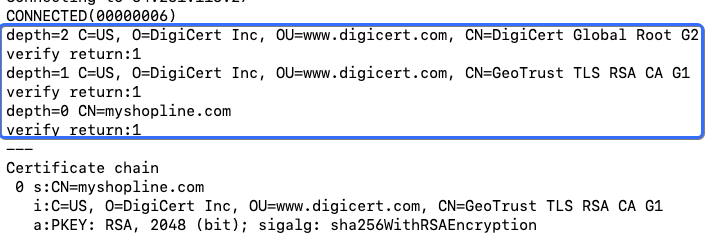
如果输出信息中包含 `error:num=20:unable to get local issuer certificate`,表示根证书升级失败。