---
title: "主题目录"

doc_type: static
doc_category: static
doc_version: v20270301
source_url:
  html: 'https://developer.shopline.com/zh-hans-cn/docs/online-store-3-0-themes/theme-structure/overview'
  md: 'https://developer.shopline.com/zh-hans-cn/docs/online-store-3-0-themes/theme-structure/overview.md'
---
# 主题目录

主题作为在线商店的载体，定义了视觉风格、用户体验和功能特性。主题的目录结构遵循 SHOPLINE 规范，这种规范让页面模板（templates）、组件（sections）、区块（blocks）等不同代码模块协同运作，共同为主题的呈现和功能实现发挥作用。标准结构如下：

```bash
.
├─ blocks          		# 可复用的区块
├─ components      		# 公共代码片段
├─ i18n            		# 多语言配置文件
├─ layout          		# 页面布局模板
├─ public          		# 静态资源（图片/CSS/JS/字体）
├─ sections        		# 页面组件与组件集
├─ templates       		# 页面模板
├─ theme.config.json  # 主题全局配置数据
└─ theme.schema.json  # 主题信息与主题全局配置定义
```

* * *

## 目录说明{#xcotv}

### layout{#aiEvu}

`layout` 包含了主题的 [布局文件](https://developer.shopline.com/zh-hans-cn/docs/online-store-3-0-themes/theme-structure/layout.md)，布局文件定义了页面的基础框架，用于统一管理页面的结构和样式。

布局文件必须包含以下占位符：

-   **header**：页头部分。
    
-   **content**：页面内容区域。
    
-   **footer**：页脚部分。
    

这些占位符用于注入全局脚本（如 JavaScript 或 CSS 文件）以及渲染页面内容。

此外，你还可以在布局文件中添加自定义的 HTML、CSS 或 JavaScript 代码，以便在多页面中快速应用相同的更改。

### templates{#GOuXm}

`templates` 包含了主题的 [模板文件](https://developer.shopline.com/zh-hans-cn/docs/online-store-3-0-themes/theme-structure/templates.md)，模板文件是主题页面渲染的基础，存储了商家自定义配置数据。

模板文件有多种页面类型，例如：

-   商品详情页
    
-   博客列表页
    

模板文件支持两种后缀名：

-   `.json`：适用于动态页面，支持通过 [组件](https://developer.shopline.com/zh-hans-cn/docs/online-store-3-0-themes/theme-structure/sections.md) 灵活搭建页面结构。
    
-   `.html`：适用于固定页面内容，通常用于静态页面，内容固定且不依赖动态数据。
    

### sections{#LHEqZ}

`sections` 包含了主题的 [组件](https://developer.shopline.com/zh-hans-cn/docs/online-store-3-0-themes/theme-structure/sections.md) 和 [组件集](https://developer.shopline.com/zh-hans-cn/docs/online-store-3-0-themes/theme-structure/sections.md#v1BKI)，是页面模板搭建的核心元素，用于定义页面模块的结构和功能，商家可以自由添加、删除、移动、编辑组件的内容模块。

### blocks{#unghh}

`blocks` 包含了主题的可复用 [区块](https://developer.shopline.com/zh-hans-cn/docs/online-store-3-0-themes/theme-structure/blocks.md)，支持在不同组件间重复引用，例如同一个按钮区块可以同时被轮播图组件和图片横幅组件引用，商家可以在主题编辑器里自由添加、删除、移动、编辑区块的内容。

### components{#pqUfS}

`components` 包含了主题的公共 [代码片段](https://developer.shopline.com/zh-hans-cn/docs/online-store-3-0-themes/theme-structure/components.md)，如图标、输入框等。你可以跨页面、跨组件的引用同一个片段，并可以传递不同的参数给相同片段，以达到不同的表现。

### public{#bXmaL}

`public` 包含了主题的所有 [静态资源](https://developer.shopline.com/zh-hans-cn/docs/online-store-3-0-themes/theme-structure/public.md) 文件（图片/CSS/JS/字体）。

### i18n{#V48X4}

`i18n` 包含了主题的 [多语言配置文件](https://developer.shopline.com/zh-hans-cn/docs/online-store-3-0-themes/theme-structure/i-18-n.md)，它支持两种文件类型，分别满足不同的场景：

-   `.json`：面向用户端显示的文本
    
-   `.schema.json`：面向商家端（主要指主题编辑器配置控件）显示的文本
    

### theme.config.json{#jwnTm}

[theme.config.json](https://developer.shopline.com/zh-hans-cn/docs/online-store-3-0-themes/theme-structure/theme-config-json.md) 用于存储主题风格及主题全局配置（如颜色、字体），支持通过主题编辑器进行调整。

### theme.schema.json{#P5aWP}

[theme.schema.json](https://developer.shopline.com/zh-hans-cn/docs/online-store-3-0-themes/theme-structure/theme-schema-json.md) 用于定义主题全局配置和记录主题元信息（如名称、版本、作者）。

* * *

## 页面组成{#xYwHZ}

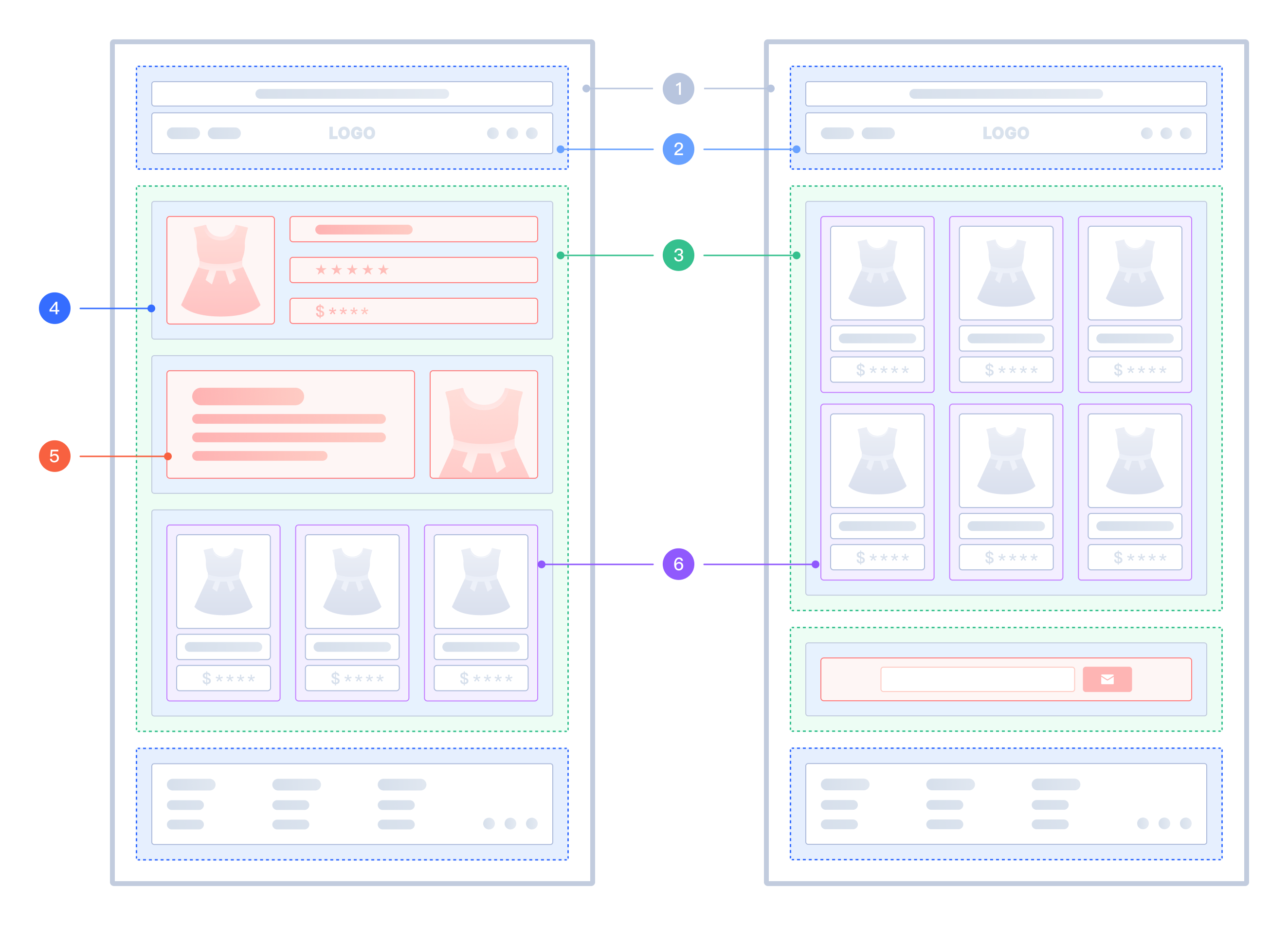
如下图片展示了主题不同模块在页面中的位置呈现：

<img src="https://cdn.myshopline.com/sl/slfs/sl-new/174678330290026/1740649922801-1127bfa5-0f48-4a88-b59d-86c627fcbf4e.png" alt="" />

<table>
  <colgroup>
    <col/>
    <col/>
    <col/>
  </colgroup>
  <tbody>
    <tr>
      <th>
        <p>序号</p>
      </th>
      <th>
        <p>主题模块</p>
      </th>
      <th>
        <p>描述</p>
      </th>
    </tr>
    <tr>
      <td colSpan="1" rowSpan="1">
        1
      </td>
      <td colSpan="1" rowSpan="1">
        布局
      </td>
      <td colSpan="1" rowSpan="1">
        基础框架，定义页面之间复用相同模块和元素，如页头、页脚。
      </td>
    </tr>
    <tr>
      <td colSpan="1" rowSpan="1">
        2
      </td>
      <td colSpan="1" rowSpan="1">
        页面模板
      </td>
      <td colSpan="1" rowSpan="1">
        决定了页面的布局和内容，支持动态配置组件。
      </td>
    </tr>
    <tr>
      <td colSpan="1" rowSpan="1">
        3
      </td>
      <td colSpan="1" rowSpan="1">
        组件集
      </td>
      <td colSpan="1" rowSpan="1">
        在布局文件中使用，支持动态配置组件，例如公告栏和菜单。
      </td>
    </tr>
    <tr>
      <td colSpan="1" rowSpan="1">
        4
      </td>
      <td colSpan="1" rowSpan="1">
        组件
      </td>
      <td colSpan="1" rowSpan="1">
        独立复用组件，支持数据配置，可在页面模板和组件集中动态添加。
      </td>
    </tr>
    <tr>
      <td colSpan="1" rowSpan="1">
        5
      </td>
      <td colSpan="1" rowSpan="1">
        组件区块
      </td>
      <td colSpan="1" rowSpan="1">
        页面组件内私有复用区块，支持数据配置。只能在对应的组件进行添加、删除等操作。
      </td>
    </tr>
    <tr>
      <td colSpan="1" rowSpan="1">
        6
      </td>
      <td colSpan="1" rowSpan="1">
        全局区块
      </td>
      <td colSpan="1" rowSpan="1">
        页面全局公有复用区块，支持数据配置。可在任意组件中进行添加、删除等操作。
      </td>
    </tr>
  </tbody>
</table>