---
title: "theme.schema.json"

doc_type: static
doc_category: static
doc_version: v20270301
source_url:
  html: 'https://developer.shopline.com/zh-hans-cn/docs/online-store-3-0-themes/theme-structure/theme-schema-json'
  md: 'https://developer.shopline.com/zh-hans-cn/docs/online-store-3-0-themes/theme-structure/theme-schema-json.md'
---
# theme.schema.json

`theme.schema.json` 是主题的全局配置定义及信息存储文件，位于项目根目录，用于定义：

-   **主题信息**：名称、版本、作者、支持链接等。
    
-   **全局配置项**：商家在主题编辑器中可配置的表单项（如颜色、字体）。
    

* * *

## 主题信息定义{#AgALW}

主题基本信息涵盖主题名称、版本号、作者等，这些信息会被运用在 [主题商城](https://themes.shopline.com/themes/Twig/styles/Default)、主题编辑器、[SHOPLINE 商家后台](https://admin.myshopline.com/) 等地方，让商家可以方便了解相关信息。

### 数据结构{#JtAWY}

以下是主题 [Bottle](https://developer.shopline.com/zh-hans-cn/docs/online-store-3-0-themes/bottle.md) 的主题信息示例：

```json
// theme.schema.json

{
  "theme_name": "Bottle",                                                                 // 主题名称
  "theme_version": "1.0.0",                                                               // 主题版本号
  "theme_author": "SHOPLINE",                                                             // 主题作者
  "theme_documentation_url": "https://themes.shopline.com/themes/Bottle/styles/Default",  // 主题介绍地址
  "theme_support_url": "https://help.shopline.com/",                                      // 帮助中心链接
  "theme_type_version": "OS_3.0",                                                         // 渲染引擎版本
  "schemas": [...]
}
```

### 字段说明{#Q12Qx}

<table>
  <colgroup>
    <col/>
    <col/>
    <col/>
  </colgroup>
  <tbody>
    <tr>
      <th>
        <p>字段</p>
      </th>
      <th>
        <p>描述</p>
      </th>
      <th>
        <p>示例</p>
      </th>
    </tr>
    <tr>
      <td colSpan="1" rowSpan="1">
        theme\_name
      </td>
      <td colSpan="1" rowSpan="1">
        主题名称
      </td>
      <td colSpan="1" rowSpan="1">
        `Bottle`
      </td>
    </tr>
    <tr>
      <td colSpan="1" rowSpan="1">
        theme\_version
      </td>
      <td colSpan="1" rowSpan="1">
        主题版本号
      </td>
      <td colSpan="1" rowSpan="1">
        `1.0.0`
      </td>
    </tr>
    <tr>
      <td colSpan="1" rowSpan="1">
        theme\_author
      </td>
      <td colSpan="1" rowSpan="1">
        主题作者
      </td>
      <td colSpan="1" rowSpan="1">
        `SHOPLINE`
      </td>
    </tr>
    <tr>
      <td colSpan="1" rowSpan="1">
        theme\_documentation\_url
      </td>
      <td colSpan="1" rowSpan="1">
        主题文档地址
      </td>
      <td colSpan="1" rowSpan="1">
        `https://themes.shopline.com/themes/Bottle/styles/Default`
      </td>
    </tr>
    <tr>
      <td colSpan="1" rowSpan="1">
        theme\_support\_url
      </td>
      <td colSpan="1" rowSpan="1">
        帮助中心链接
      </td>
      <td colSpan="1" rowSpan="1">
        `https://help.shopline.com/`
      </td>
    </tr>
    <tr>
      <td colSpan="1" rowSpan="1">
        theme\_type\_version
      </td>
      <td colSpan="1" rowSpan="1">
        渲染引擎版本
      </td>
      <td colSpan="1" rowSpan="1">
        `OS\_3.0`
      </td>
    </tr>
  </tbody>
</table>

* * *

## 全局配置项定义{#UtT0k}

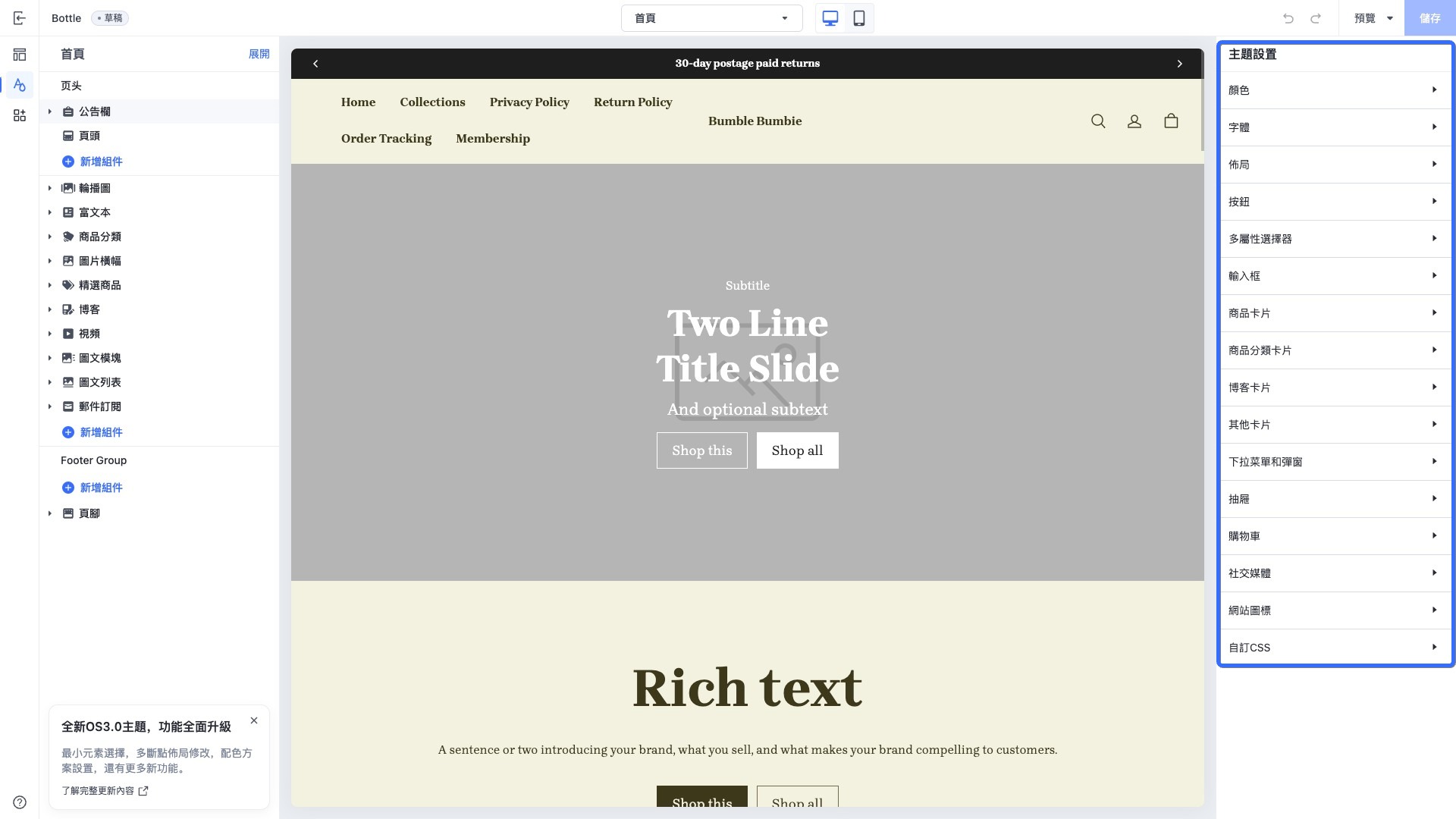
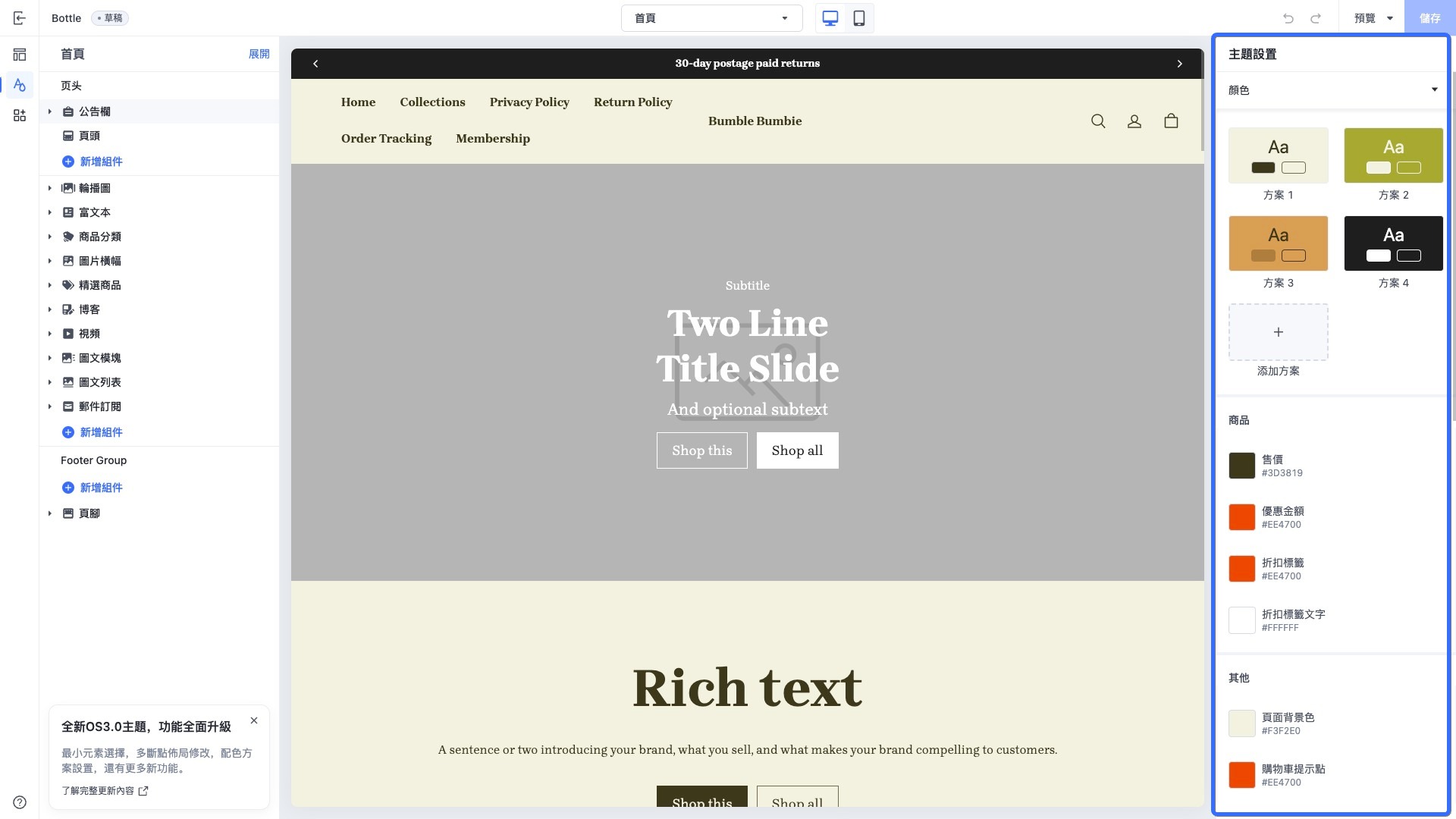
主题全局配置是主题的公共配置，一般会把主题的通用配置定义在全局配置中，例如以下几种场景：

-   **字体**：定义所有页面使用的字体。
    
-   **输入框**：定义所有页面输入框样式。
    
-   **加购方式**：定义所有加购跳转的交互方式。
    

所有的页面模板、组件、区块都可以通过 [settings](https://developer.shopline.com/zh-hans-cn/docs/sline/object/settings.md) object 访问全局配置数据。

### 数据结构{#Y0Sof}

以下是主题 [Bottle](https://developer.shopline.com/zh-hans-cn/docs/online-store-3-0-themes/bottle.md) 的全局配置项定义部分示例，它们存储在 `schemas` 字段里：

```json
// theme.schema.json

{
  ...
  "schemas": [                       // 配置项集合
    {
      "name": "Color",               // 配置分类名称
      "settings": [                  // 配置项列表
        {
          "type": "color",           // 配置项控件类型
          "label": "Sale",           // 配置项标签
          "id": "color_sale",        // 配置项唯一标识
          "default": "#3D3819"       // 配置默认值
        }
      ]
    },
    {
      "name": "Font",
      "settings": [
        {
          "type": "font",
          "label": "Font",
          "id": "title_font",
          "default": "Brygada 1918:700"
        }
      ]
    }
  ]
}
```

### 字段说明{#I2F9R}

<table>
  <colgroup>
    <col/>
    <col/>
    <col/>
  </colgroup>
  <tbody>
    <tr>
      <th>
        <p>字段</p>
      </th>
      <th>
        <p>描述</p>
      </th>
      <th>
        <p>示例值</p>
      </th>
    </tr>
    <tr>
      <td colSpan="1" rowSpan="1">
        schemas
      </td>
      <td colSpan="1" rowSpan="1">
        配置项分类集合
      </td>
      <td colSpan="1" rowSpan="1">
        [如上所示](#Y0Sof)
      </td>
    </tr>
    <tr>
      <td colSpan="1" rowSpan="1">
        name
      </td>
      <td colSpan="1" rowSpan="1">
        配置分类名称
      </td>
      <td colSpan="1" rowSpan="1">
        `Color`
      </td>
    </tr>
    <tr>
      <td colSpan="1" rowSpan="1">
        settings
      </td>
      <td colSpan="1" rowSpan="1">
        配置项列表
      </td>
      <td colSpan="1" rowSpan="1">
        [如上所示](#Y0Sof)
      </td>
    </tr>
    <tr>
      <td colSpan="1" rowSpan="1">
        type
      </td>
      <td colSpan="1" rowSpan="1">
        [配置项控件](https://developer.shopline.com/zh-hans-cn/docs/online-store-3-0-themes/theme-and-editor-interaction/editor-controls.md) 类型（如 color、font）
      </td>
      <td colSpan="1" rowSpan="1">
        `color`
      </td>
    </tr>
    <tr>
      <td colSpan="1" rowSpan="1">
        label
      </td>
      <td colSpan="1" rowSpan="1">
        配置项标签
      </td>
      <td colSpan="1" rowSpan="1">
        `Sale`
      </td>
    </tr>
    <tr>
      <td colSpan="1" rowSpan="1">
        id
      </td>
      <td colSpan="1" rowSpan="1">
        配置项唯一标识
      </td>
      <td colSpan="1" rowSpan="1">
        `color\_sale`
      </td>
    </tr>
    <tr>
      <td colSpan="1" rowSpan="1">
        default
      </td>
      <td colSpan="1" rowSpan="1">
        配置项默认值
      </td>
      <td colSpan="1" rowSpan="1">
        `#3D3819`
      </td>
    </tr>
  </tbody>
</table>

### 应用场景示例{#iqYH7}

以下是主题 Bottle 在编辑器中的全局配置界面截图：

<img src="https://cdn.myshopline.com/sl/slfs/sl-new/174701490281045/1740550237688-e4b84bf3-352e-4435-bba7-b7653113535b.jpeg" alt="" /><img src="https://cdn.myshopline.com/sl/slfs/sl-new/174701499079478/1740550295746-87161eea-4d39-44ef-843c-98cdd1d53db5.jpeg" alt="" />