Loading
Loading is a component for displaying a global loading state. By showing a progress bar animation at the top of the SHOPLINE Admin, it informs merchants that the app is processing a request or loading data. This helps effectively manage expectations, letting merchants know the app's response status and preventing uncertainty due to waiting.
Quick start
The following example demonstrates the basic implementation of the Loading component:
import Client, { Loading, shared } from '@shoplineos/app-bridge';
// 1. Initialize App Bridge.
const app = Client.createApp({
  appKey: 'your-app-key',
  host: shared.getHost(),
});
// 2. Create a Loading instance.
const loading = Loading.create(app);
// 3. Show loading state.
loading.trigger();
setTimeout(() => {
  loading.exit();
}, 2000);
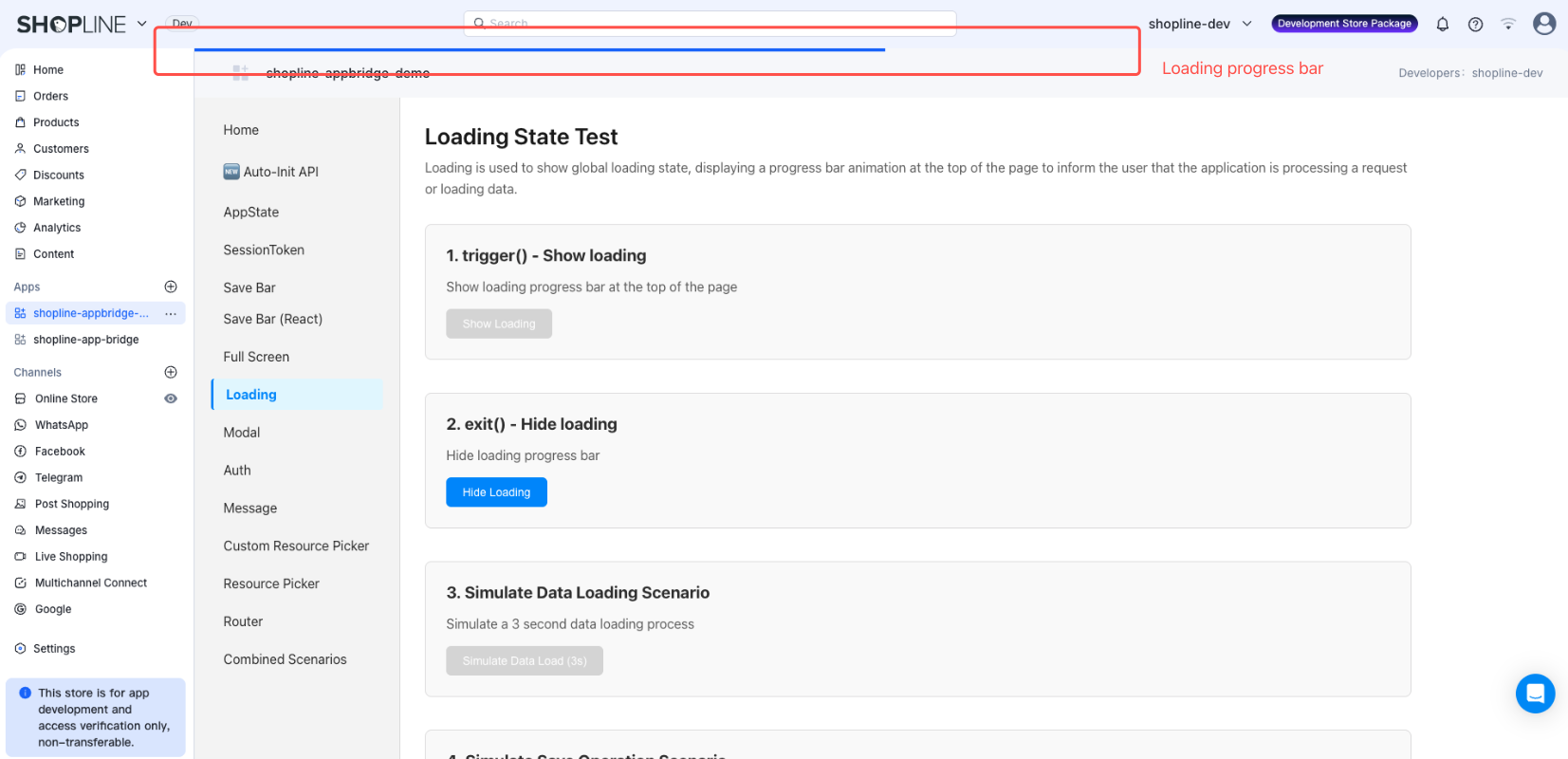
After you call the trigger() method, a loading progress bar will appear at the top of the page. The effect is as follows:
API methods
trigger()
(): void
Starts showing the loading state.
Example
// Show loading state.
loading.trigger();
exit()
(): void
Ends and hides the loading state.
Example
// Hide loading state.
loading.exit();
Examples
Example 1: Data loading
import Client, { Loading, shared } from '@shoplineos/app-bridge';
const app = Client.createApp({
  appKey: 'your-app-key',
  host: shared.getHost(),
});
const loading = Loading.create(app);
// Load product data.
const fetchProducts = async () => {
  // Show loading state.
  loading.trigger();
  try {
    const response = await fetch('/api/products');
    const products = await response.json();
    // Process data.
    console.log('Product data:', products);
  } catch (error) {
    console.error('Loading failed:', error);
  } finally {
    loading.exit();
  }
};
fetchProducts();
Example 2: Form save
const handleSave = async (formData) => {
  // Show loading state.
  loading.trigger();
  try {
    // Submit form data.
    await saveProduct(formData);
    // Save was successful.
    console.log('Save successful.');
  } catch (error) {
    // Save failed.
    console.error('Save failed:', error);
  } finally {
    // End loading state.
    loading.exit();
  }
};
Important notes
Always use trigger() and exit() together
Every call to trigger() must be followed by a corresponding call to exit(). Otherwise, the loading state will persist, negatively impacting the user experience.
// Recommended: Use try-finally to ensure that exit() is called.
const loadData = async () => {
  loading.trigger();
  try {
    await fetchData();
  } finally {
    loading.exit(); // Execute regardless of success or failure.
  }
};
Avoid repeated use
Do not call trigger() repeatedly when the loading state is already showing, as this may prevent the loading state from closing correctly.
// Not recommended: Repeated use
loading.trigger();
loading.trigger(); // Avoid repeated calls.
loading.exit(); // May not close correctly.
// Recommended: Use a flag for control
let isLoading = false;
const loadData = async () => {
  if (isLoading) return;
  isLoading = true;
  loading.trigger();
  try {
    await fetchData();
  } finally {
    loading.exit();
    isLoading = false;
  }
};

'%3e%3crect%20x='6'%20y='7.13049'%20width='13'%20height='10'%20rx='1'%20fill='black'/%3e%3cpath%20d='M12.4998%2012.936L-3.65042%200.604835L28.65%200.604838L12.4998%2012.936Z'%20stroke='white'%20stroke-linejoin='round'/%3e%3c/g%3e%3cdefs%3e%3cclipPath%20id='clip0_716_14611'%3e%3crect%20x='6'%20y='7.13049'%20width='13'%20height='10'%20rx='1'%20fill='white'/%3e%3c/clipPath%3e%3c/defs%3e%3c/svg%3e)

'%3e%3crect%20x='5.63086'%20y='7.26086'%20width='13'%20height='10'%20rx='1'%20fill='white'/%3e%3cpath%20d='M12.1306%2013.0664L-4.01956%200.735206L28.2809%200.735209L12.1306%2013.0664Z'%20stroke='%231A2C42'%20stroke-linejoin='round'/%3e%3c/g%3e%3cdefs%3e%3cclipPath%20id='clip0_716_14599'%3e%3crect%20x='5.63086'%20y='7.26086'%20width='13'%20height='10'%20rx='1'%20fill='white'/%3e%3c/clipPath%3e%3c/defs%3e%3c/svg%3e)