Modal
Modal is a dialog component used to display important information, warning prompts, or actions requiring confirmation on top of the current page. Modal provides multiple modal types (such as confirmation, warning, error, and success prompts), helping apps achieve a unified modal interaction experience.
Quick start
The following example demonstrates the basic implementation of the Modal component:
import Client, { shared, Modal, ModalAction } from '@shoplineos/app-bridge';
// 1. Initialize App Bridge.
const app = Client.createApp({
  appKey: 'your-app-key',
  host: shared.getHost(),
});
// 2. Create a Modal instance.
const modal = Modal.create(app);
// 3. Open a confirmation modal.
modal.open({
  type: 'confirm',
  title: 'Confirm Deletion',
  content: 'Are you sure you want to delete the product? This operation cannot be undone.',
});
// 4. Subscribe to the confirmation event.
modal.subscribe(ModalAction.MODAL_SAVE, () => {
  console.log('Confirm is clicked');
  // Execute the delete operation
});
// 5. Subscribe to the cancellation event.
modal.subscribe(ModalAction.MODAL_CLOSE, () => {
  console.log('Cancel is clicked');
});
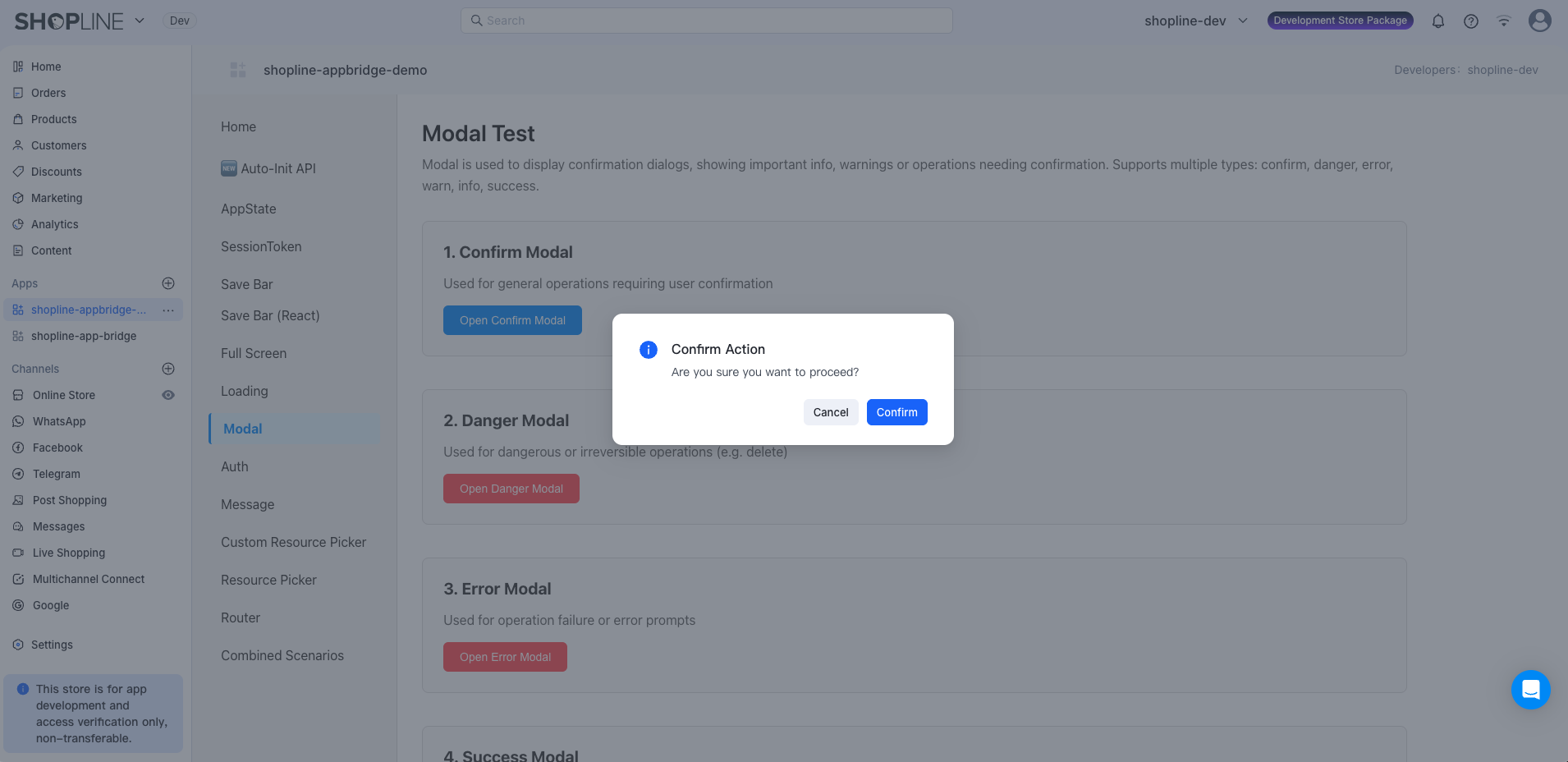
After you call the open() method, the modal will appear on the page. The following figure shows the effect of a confirmation modal:
API methods
open()
(config: ModalProps): void
Opens the modal.
Parameters
| Parameter | Type | Description | Required |
|---|---|---|---|
| config | ModalProps | Modal configuration. | Yes |
Example
// Confirmation modal
modal.open({
  type: 'confirm',
  title: 'Confirm Action',
  content: 'Are you sure you want to proceed?',
});
// Risk modal
modal.open({
  type: 'danger',
  title: 'Risky Operation',
  content: 'This operation will permanently delete the data and cannot be undone.',
});
// Error prompt modal
modal.open({
  type: 'error',
  title: 'Operation Failed',
  content: 'Save failed. Try again later.',
});
// Success prompt modal
modal.open({
  type: 'success',
  title: 'Operation Successful',
  content: 'Product saved successfully.',
});
// Warning modal
modal.open({
  type: 'warn',
  title: 'Warning',
  content: 'You have unsaved changes. Are you sure you want to leave?',
});
// Information prompt modal
modal.open({
  type: 'info',
  title: 'Tip',
  content: 'This feature is coming soon. Stay tuned.',
});
subscribe()
(action: ModalAction, callback: () => void, once?: boolean): () => void
Subscribes to modal action events (such as confirmation and cancellation).
Parameters
| Parameter | Type | Description | Required |
|---|---|---|---|
| action | ModalAction | The action type to subscribe to. | Yes |
| callback | () => void | The callback function triggered when the action occurs. | Yes |
| once | boolean | Whether to automatically unsubscribe after one trigger. • true: Automatically unsubscribes after one trigger.• false: Does not automatically unsubscribe, but requires manual unsubscription. | No |
Return value
Returns an unsubscribe function. Calling it will cancel the current subscription.
Example
// Subscribe to the confirmation event.
const unsubscribe = modal.subscribe(ModalAction.MODAL_SAVE, () => {
  console.log('Operation is confirmed.');
  // Execute corresponding business logic
});
// Unsubscribe.
unsubscribe();
// Subscribe to a one-time event (automatically unsubscribed from after a trigger).
modal.subscribe(
  ModalAction.MODAL_SAVE,
  () => {
    console.log('This callback will only execute once.');
  },
  true,
);
unsubscribe()
(action: ModalAction): void
Unsubscribes from all listeners for a specified action.
Parameters
| Parameter | Type | Description | Required |
|---|---|---|---|
| action | ModalAction | The action type to unsubscribe from. | Yes |
Example
// Unsubscribe from all listeners for the MODAL_SAVE action.
modal.unsubscribe(ModalAction.MODAL_SAVE);
Type definitions
ModalProps
Configuration parameters for the open() method.
| Parameter | Type | Description | Required |
|---|---|---|---|
| type | 'confirm' | 'danger' | 'error' | 'warn' | 'info' | 'success' | The modal type, which determines the modal's style and icon. | Yes |
| title | string | The modal title text. | Yes |
| content | string | The modal content text. | Yes |
Modal types:
| Type | Description | Use case |
|---|---|---|
confirm | Confirmation modal | Operations requiring user confirmation |
danger | Risk modal | Risky or irreversible operations |
error | Error prompt modal | Operation failures or errors |
warn | Warning modal | Warning messages or important notes |
info | Information prompt modal | General information prompts |
success | Success prompt modal | Feedback for successful operations |
ModalAction
Subscribe to the following actions via the subscribe() method to listen to various modal events.
| Action Type | Description | Trigger condition | Callback parameter |
|---|---|---|---|
MODAL_SAVE | Confirm | Triggered when the confirm button is clicked. | None |
MODAL_CLOSE | Cancel or close | Triggered when the cancel button is clicked or the modal is closed. | None |
Examples
Example 1: Confirm deletion
const handleDelete = (productId) => {
  // Open the confirmation modal.
  modal.open({
    type: 'danger',
    title: 'Confirm Deletion',
    content: 'Are you sure you want to delete the product? This operation cannot be undone.',
  });
  // Subscribe to the confirmation event (one-time subscription).
  modal.subscribe(
    ModalAction.MODAL_SAVE,
    async () => {
      try {
        // Execute delete operation
        await deleteProduct(productId);
        // Show success prompt
        modal.open({
          type: 'success',
          title: 'Deletion Successful',
          content: 'Product deleted successfully.',
        });
      } catch (error) {
        // Show error prompt
        modal.open({
          type: 'error',
          title: 'Deletion Failed',
          content: 'An error occurred while deleting the product. Try again later.',
        });
      }
    },
    true, // One-time subscription
  );
};
Example 2: Confirm save
const handleSave = (formData) => {
  modal.open({
    type: 'confirm',
    title: 'Confirm Save',
    content: 'Are you sure you want to save the current changes?',
  });
  modal.subscribe(
    ModalAction.MODAL_SAVE,
    async () => {
      try {
        await saveData(formData);
        modal.open({
          type: 'success',
          title: 'Save Successful',
          content: 'Data saved successfully.',
        });
      } catch (error) {
        modal.open({
          type: 'error',
          title: 'Save Failed',
          content: error.message,
        });
      }
    },
    true,
  );
};
Example 3: Confirm exit
const handleExit = () => {
  if (hasUnsavedChanges) {
    modal.open({
      type: 'warn',
      title: 'Unsaved Changes',
      content: 'You have unsaved changes. Are you sure you want to leave?',
    });
    modal.subscribe(
      ModalAction.MODAL_SAVE,
      () => {
        // Confirm exit
        window.location.href = '/dashboard';
      },
      true,
    );
    modal.subscribe(
      ModalAction.MODAL_CLOSE,
      () => {
        // Cancel exit
        console.log('Exit is canceled.');
      },
      true,
    );
  } else {
    // No unsaved changes. Leave directly.
    window.location.href = '/dashboard';
  }
};

'%3e%3crect%20x='6'%20y='7.13049'%20width='13'%20height='10'%20rx='1'%20fill='black'/%3e%3cpath%20d='M12.4998%2012.936L-3.65042%200.604835L28.65%200.604838L12.4998%2012.936Z'%20stroke='white'%20stroke-linejoin='round'/%3e%3c/g%3e%3cdefs%3e%3cclipPath%20id='clip0_716_14611'%3e%3crect%20x='6'%20y='7.13049'%20width='13'%20height='10'%20rx='1'%20fill='white'/%3e%3c/clipPath%3e%3c/defs%3e%3c/svg%3e)

'%3e%3crect%20x='5.63086'%20y='7.26086'%20width='13'%20height='10'%20rx='1'%20fill='white'/%3e%3cpath%20d='M12.1306%2013.0664L-4.01956%200.735206L28.2809%200.735209L12.1306%2013.0664Z'%20stroke='%231A2C42'%20stroke-linejoin='round'/%3e%3c/g%3e%3cdefs%3e%3cclipPath%20id='clip0_716_14599'%3e%3crect%20x='5.63086'%20y='7.26086'%20width='13'%20height='10'%20rx='1'%20fill='white'/%3e%3c/clipPath%3e%3c/defs%3e%3c/svg%3e)