Arabic
In HTML, text direction is typically inherited from the explicit setting of a parent element via the dir attribute. If the dir attribute is not specified, the document's default text direction is ltr (left-to-right). Arabic, however, follows an rtl (right-to-left) reading pattern, which runs counter to this default behavior.
ltr(left to right): Text flows from left to right. This is used for languages written from left to right (such as English).rtl(right to left): Text flows from right to left. This is used for languages written from right to left (such as Arabic).
Supporting RTL text direction for Arabic
Suppose your page displays a sentence from left to right. When a customer views the page in Arabic, the expected visual order of the localized text should naturally flow from right to left. To properly support the Arabic text direction, complete the following steps.
Step 1: Add a global dir attribute
Add the dir attribute to your <html> tag and set its value to request.document_direction.
This ensures that the appropriate text direction is dynamically applied when the page renders based on the current language. For example, if the active language is English, it outputs ltr; if the language is Arabic, it outputs rtl.
Example:
<html dir="{{request.document_direction}}">
  ...
</html>
Step 2: Generate an RTL CSS file
When building your theme code, you can use the RTLCSS tool to automatically convert relevant CSS properties to accommodate the RTL layout. The tool will generate two separate CSS files: one for LTR and another for RTL.
Sample LTR CSS file
.example {
  display: inline-block;
  padding: 5px 10px 15px 20px;
  margin: 5px 5px 15px 8px;
  border-width: 1px 2px 3px 4px;
}
Sample RTL CSS file
.example {
  display: inline-block;
  padding: 5px 20px 15px 10px;
  margin: 5px 8px 15px 5px;
  border-width: 1px 4px 3px 2px;
}
Summary
By comparing the two files, you can see that the horizontal (left and right) values for certain properties are swapped in the RTL CSS file. This effectively mirrors the layout to support right-to-left reading patterns.
Step 3: Include the CSS file in your theme code
You can conditionally include either the LTR or RTL CSS file based on the value of request.document_direction.
{{#if request.document_direction == "rtl"}}
  <link rel="stylesheet" href="{{"example.rtl.css" | asset_url()}}" />	// RTL CSS file
{{#else /}}
  <link rel="stylesheet" href="{{"example.css" | asset_url()}}" />			// LTR CSS file
{{/if}}
Best practices
Handling RTL layouts with inline CSS
In certain scenarios, you might need to write inline CSS styles. However, inline styles cannot be automatically processed by the RTLCSS tool. To resolve this, you can use conditional statements to check the request.document_direction value and output the correct styles.
Example:
<style>
{{#if request.document_direction == "rtl"}}
  .example {
    padding: 5px 20px 15px 10px;
  }
{{#else /}}
  .example {
    padding: 5px 10px 15px 20px;
  }
{{/if}}
</style>
We recommend using the <link> tag to load external CSS files as the primary approach for your theme. This not only optimizes rendering performance, but also allows you to manage the document's text direction globally using automated tools.
Supporting RTL for SVG icons
In scenarios where text is paired with an SVG icon, simply changing the text direction to RTL might not yield the expected visual results. See the following examples:
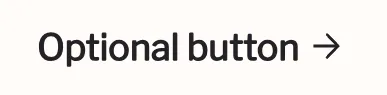
Under the RTL layout:
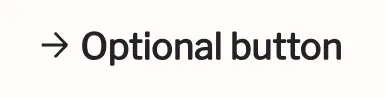
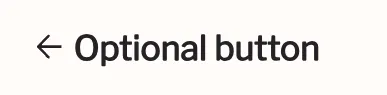
By comparing the two results, you'll notice that the arrow in the RTL layout still points to the right. To fix this, you must apply a CSS mirror transform to the SVG icon.
Example:
.icon {
  transform: matrix(-1, 0, 0, 1, 0, 0);
}
Once this style is applied, the SVG icon will correctly reflect the expected RTL visual flow:
RTL support for theme app extensions
Theme app extensions natively support RTL configurations optimized for Arabic. For more information, refer to rtl_stylesheet.
Forcing LTR layout
Certain specific elements, such as prices and currencies, are not expected to be displayed in an RTL direction. For these elements, you can use the CSS direction and unicode-bidi properties to forcefully apply an LTR layout.
Example:
.price {
  direction: ltr;
  unicode-bidi: isolate;
}

'%3e%3crect%20x='6'%20y='7.13049'%20width='13'%20height='10'%20rx='1'%20fill='black'/%3e%3cpath%20d='M12.4998%2012.936L-3.65042%200.604835L28.65%200.604838L12.4998%2012.936Z'%20stroke='white'%20stroke-linejoin='round'/%3e%3c/g%3e%3cdefs%3e%3cclipPath%20id='clip0_716_14611'%3e%3crect%20x='6'%20y='7.13049'%20width='13'%20height='10'%20rx='1'%20fill='white'/%3e%3c/clipPath%3e%3c/defs%3e%3c/svg%3e)

'%3e%3crect%20x='5.63086'%20y='7.26086'%20width='13'%20height='10'%20rx='1'%20fill='white'/%3e%3cpath%20d='M12.1306%2013.0664L-4.01956%200.735206L28.2809%200.735209L12.1306%2013.0664Z'%20stroke='%231A2C42'%20stroke-linejoin='round'/%3e%3c/g%3e%3cdefs%3e%3cclipPath%20id='clip0_716_14599'%3e%3crect%20x='5.63086'%20y='7.26086'%20width='13'%20height='10'%20rx='1'%20fill='white'/%3e%3c/clipPath%3e%3c/defs%3e%3c/svg%3e)