Section schema
section 支持 section 特有的 Handlebars helper {{#schema}}标记 , 此标记允许你定义一个 section 的各种属性,例如 section 名称、任何 section block 以及允许主题编辑器自定义选项的设置。
Schema
每个 section 只能有一个 {{#schema}} 标记,它必须包含一个有效的 JSON 格式数据,它不能被嵌套在 Handlebars 标记内使用,此 Schame 的内部由如下的属性组成:
此外,还可以使用以下属性来制定可以使用section的位置:
- enabled_on : 将section限制为指定模版和section group可用。
- disabled_on : 将section阻止在指定模版和section group可用。
{{#schema}} 是一个 Handlebars helper 。但是,它不会输出其内容,也不会渲染其中包含的任何Handlebars 。
Content
在 {{#schema}} 里面的内容可以包含以下属性:
name
name 属性决定了显示在主题编辑器中的 section 标题。例如,下面的 schema 将显示以下的输出:
{{#schema}}
{
  "name": "轮播图",
}
{{/schema}}
输出: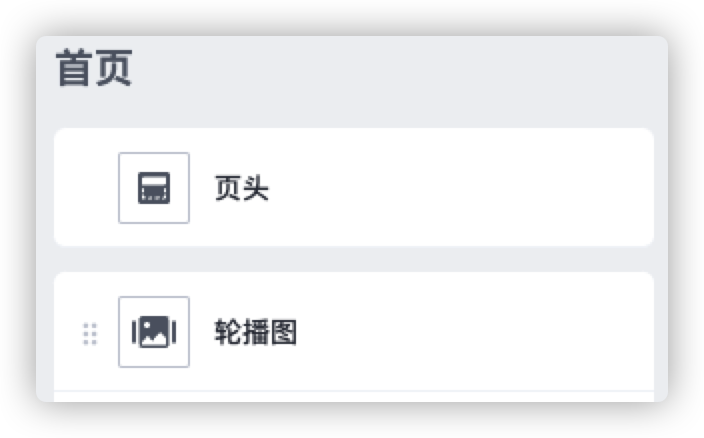
class
当 Shopline 渲染一个 section 时,它被包裹在一个含有 shopline-section class 的 HTML 元素中。你可以用 class 属性定义这个 HTML 元素的 class 值,例如:
{{#schema}}
{
  "name": "Slideshow",
  "class": "slideshow"
}
{{/schema}}
输出如下 HTML 片段:
<section id="shopline-section-[id]" class="shopline-section slideshow">
  // 输出 section 内容
</section>
settings
你可以创建 section 特定的配置项来允许商家使用 settings 对象自定义 section:
{{#schema}}
{
  "name": "Slideshow",
  "tag": "section",
  "class": "slideshow",
  "settings": [
    {
      "type": "text",
      "id": "header",
      "label": "Header"
    }
  ]
}
{{/schema}}
所有 section 的 setting IDs 必须在每个 section 内是唯一的。在一个 section 内有重复的 ID 将导致报错。
访问 Section 配置
Section 设置可以通过 section handlebars 对象访问。请参考访问配置了解更多。
如果一个 section 是静态渲染的,那么在所有静态渲染中,该 section 只有一个实例,因此它们都共享相同的section 设置值。
blocks
你可以为一个 section 创建 block。block 是可重复使用的内容模块,可以在一个 section 内添加、删除和重新排序。
Blocks 具有以下属性:
| 属性 | 描述 | 必填 |
|---|---|---|
type | block 的类型。这是一个自由格式的字符串,你可以用它作为一个标识符。你可以通过 Handlebars block 对象的 type 属性访问这个值。 | Yes |
name | block 的名称,它将在主题编辑器中显示为 block 的标题。 | Yes |
limit | 可以使用该类型的 block 的数量。 | No |
settings | 任何你想对该 block 进行的设置。 某些设置可能被用作主题编辑器中区块的标题 | No |
icon | 设计栏 block 拖拽区块的左侧图标; 若不配置默认为:  目前支持图标: - comment:  - navigation:  - email:  - image:  - imageText:  - post:  - product:  - productCategories:  - text:  - video:  - title:  - paragraph:  - button:  - normal:  | No |
下面是在一个 section 中包括 block 的例子。
{{#schema}}
{
  "name": "Slideshow",
  "class": "slideshow",
  "settings": [
    {
      "type": "text",
      "id": "title",
      "label": "Slideshow"
    }
  ],
  "blocks": [
    {
      "name": "Slide",
      "type": "slide",
      "icon": "image",
      "settings": [
        {
          "type": "image_picker",
          "id": "image",
          "label": "Image"
        }
      ]
    }
  ]
}
{{/schema}}
所有 block 名称和类型在每个 section 中必须是唯一的,并且所有设置 ID 在每个 block 中必须是唯一的。有重复会导致报错。
访问 block 配置
Block setting 可以通过 Handlebars block 对象访问。请参考访问设置以了解更多。
如果一个 section 是静态渲染的,那么所有静态渲染中只有该 section 的一个实例,这意味着它们都共享相同的 block 设置值
渲染 blocks
你可以通过循环查看 section 对象的 blocks 属性来渲染一个 section 的 blocks。
{{#each section.blocks as |block|}}
	{{#if block.type '==' 'slide' }}
		<div class="slide" {{ block.shopline_attributes }}>
            <img class="hero__image" src="{{ block.settings.image.url }}">
        </div>
	{{/if}}
{{/each}}
在上面的例子中,每个 block 的内容都包含在一个父容器内,该容器有 {{ block.shopline_attributes }}作为一个属性添加。
如果区块是一个单一的元素,那么要确保该元素有这个属性。
在主题编辑器中显示动态 block 标题
在某些情况下,主题编辑器可以将一个输入设置值显示为主题编辑器侧边栏中一个 block 的标题。这可以帮助商家识别和重新排列 block。
主题编辑器会检查 block 中设置的 id值,以确定 block 标题使用的最佳值。
主题编辑器使用具有以下id值的设置,按优先次序排列:
headingtitletext
如果一个具有匹配 id 值的设置不存在,那么块的名称将被用作标题。
例如,这个设置 id 为标题的 block 显示在侧边栏中,标题为 Welcome to our store
"blocks": [
  {
    "name": "Announcement",
    "type": "announcement",
    "settings": [
      {
        "type": "text",
        "id": "heading",
        "default": "Welcome to our store",
        "label": "Heading"
      }
    ]
  }
]
max_blocks
使用 max_blocks属性可以设置在主题编辑器里最多可以添加多少个 blocks
{{#schema}}
{
  "name": "Slideshow",
  "class": "slideshow",
  "max_blocks": 5,
  "settings": [
    {
      "type": "text",
      "id": "title",
      "label": "Slideshow"
    }
  ],
  "blocks": [
    {
      "name": "Slide",
      "type": "slide",
      "settings": [
        {
          "type": "image_picker",
          "id": "image",
          "label": "Image"
        }
      ]
    }
  ]
}
{{/schema}}
presets
Section presets 是 section 的默认配置,允许商家通过主题编辑器轻松地将 section 添加到 JSON template 中。当没有设置该属性时,如果有设置 default属性,则会使用 default下的配置。
presets 对象有以下属性:
| 属性 | 描述 | 必填 |
|---|---|---|
name | 预设名称,它将显示在主题编辑器的添加组件的名称上。 | Yes |
settings | 你可能想要填充的任何设置的默认值的列表。每个条目应包括设置名称和值。 | No |
blocks | 一个你可能想要包括的默认块的列表。每个条目应该是一个具有 type 和 settings属性的对象。type属性值表示块的类型,而settings对象与上述 settings 属性的格式相同。 | No |
下面是在一个 section 中包括预置的例子:
{{#schema}}
{
  "name": "Slideshow",
  "tag": "section",
  "class": "slideshow",
  "max_blocks": 5,
  "settings": [
    {
      "type": "text",
      "id": "title",
      "label": "Slideshow"
    }
  ],
  "blocks": [
    {
      "name": "Slide",
      "type": "slide",
      "settings": [
        {
          "type": "image_picker",
          "id": "image",
          "label": "Image"
        }
      ]
    }
  ]
  "presets": [
    {
      "name": "Slideshow",
      "settings": {
        "title": "Slideshow"
      },
      "blocks": [
        {
          "type": "image",
          "settings": []
        },
        {
          "type": "image",
          "settings": []
        }
      ]
     }
   ]
}
{{/schema}}
有 presets 的 section 不应该用在静态渲染。如果你要静态地渲染一个 section ,那么你应该使用 default 设置。
default
如果你想静态渲染一个 section,那么你可以用 default 对象定义一个默认配置,它的属性与 presets 对象相同。
default 的例子:
{{#schema}}
{
  "name": "Slideshow",
  "tag": "section",
  "class": "slideshow",
  "max_blocks": 5,
  "settings": [
    {
      "type": "text",
      "id": "title",
      "label": "Slideshow"
    }
  ],
  "blocks": [
    {
      "name": "Slide",
      "type": "slide",
      "settings": [
        {
          "type": "image_picker",
          "id": "image",
          "label": "Image"
        }
      ]
    }
  ]
  "default": {
    "settings": {
      "title": "Slideshow"
    },
    "blocks": [
      {
        "type": "image",
        "settings": []
      },
      {
        "type": "image",
        "settings": []
      }
    ]
  }
}
{{/schema}}
重复使用在主题的 section 使用 section 的 default 属性。在主题上安装静态渲染的 section 应该使用section 定义的 default 默认配置。
locales
Sections 可以通过 locales对象提供给自己一系列翻译字符串,这和主题的 Locales目录是分开的,因此对于打算安装在多个主题或者店铺上的 section 来说,它是一个有用的特性。locales对象有如下的通用格式:
{
  "locales": {
    "language": {
      "translation_key": "translation_value"
    }
  }
}
例如:
{{#schema}}
{
  "name": "Slideshow",
  "class": "slideshow",
  "max_blocks": 5,
  "settings": [
    {
      "type": "text",
      "id": "title",
      "label": "Slideshow"
    }
  ],
  "blocks": [
     {
       "name": "Slide",
       "type": "slide",
       "settings": [
         {
           "type": "image_picker",
           "id": "image",
           "label": "Image"
         }
       ]
     }
   ],
   "default": {
    "settings": {
      "title": "Slideshow"
    },
    "blocks": [
      {
        "type": "slide"
      },
      {
        "type": "slide"
      }
    ]
  },
  "locales": {
      "en": {
        "title": "Slideshow"
      },
      "fr": {
        "title": "Diaporama"
      }
  }
}
{{/schema}}
可以通过 Handlebar helper t来访问这些多语言文案,其中 key 的格式如下:
sections.[section-name].[translation-description]
例如,如果像上面那个例子那样使用 title的多语言文案,可以像下面这样使用:
{{ t 'sections.slideshow.title' }}
enabled_on
您可以通过属性 enabled_on 指定某些模板页面类型和section类型可添加及渲染。
enabled_on/disabled_on 替换了templates属性。
enabled_on/disabled_on 只能使用其中之一。
enabled_on 必须至少具有以下其中一个属性:
| 属性 | 描述 |
|---|---|
templates | 指定此section可以使用的页面类型。支持的值包括:页面类型的列表,例如 ["index", "collection"];使用 ["*"] 表示所有页面类型。 |
groups | 指定此section可以使用的section groups。支持的值包括:section groups类型的列表,例如 ["header", "footer"];使用 ["*"] 表示所有section group类型。 |
在以下例子中,该section可以用于所有模版和类型为header的section group:
{{#schema}}
{
  "name": "Slideshow",
  "class": "slideshow",
  "enabled_on": {
    "templates": ["*"],
    "groups": ["header"]
  },
  "max_blocks": 5,
  "settings": [
    {
      "type": "text",
      "id": "title",
      "label": "Slideshow"
    }
  ],
  "blocks": [
     {
       "name": "Slide",
       "type": "slide",
       "settings": [
         {
           "type": "image_picker",
           "id": "image",
           "label": "Image"
         }
       ]
     }
   ],
   "default": {
    "settings": {
      "title": "Slideshow"
    },
    "blocks": [
      {
        "type": "slide"
      },
      {
        "type": "slide"
      }
    ]
  },
  "locales": {
      "en": {
        "title": "Slideshow"
      },
      "fr": {
        "title": "Diaporama"
      }
  }
}
{{/schema}}
disabled_on
您可以通过属性 disabled_on 禁止某些模板页面类型和section类型添加及渲染。
enabled_on/disabled_on 替换了templates属性。
enabled_on/disabled_on 只能使用其中之一。
disabled_on 必须至少具有以下其中一个属性:
| 属性 | 描述 |
|---|---|
templates | 禁止此section可以使用的页面类型。支持的值包括:页面类型的列表,例如 ["index", "collection"];使用 ["*"] 表示所有页面类型。 |
groups | 禁止此section可以使用的section groups。支持的值包括:section groups类型的列表,例如 ["header", "footer"];使用 ["*"] 表示所有section group类型。 |
在以下例子中,该section可以禁止所有模版和类型为header的section group:
{{#schema}}
{
  "name": "Slideshow",
  "class": "slideshow",
  "disabled_on": {
    "templates": ["*"],
    "groups": ["header"]
  },
  "max_blocks": 5,
  "settings": [
    {
      "type": "text",
      "id": "title",
      "label": "Slideshow"
    }
  ],
  "blocks": [
     {
       "name": "Slide",
       "type": "slide",
       "settings": [
         {
           "type": "image_picker",
           "id": "image",
           "label": "Image"
         }
       ]
     }
   ],
   "default": {
    "settings": {
      "title": "Slideshow"
    },
    "blocks": [
      {
        "type": "slide"
      },
      {
        "type": "slide"
      }
    ]
  },
  "locales": {
      "en": {
        "title": "Slideshow"
      },
      "fr": {
        "title": "Diaporama"
      }
  }
}
{{/schema}}

'%3e%3crect%20x='6'%20y='7.13049'%20width='13'%20height='10'%20rx='1'%20fill='black'/%3e%3cpath%20d='M12.4998%2012.936L-3.65042%200.604835L28.65%200.604838L12.4998%2012.936Z'%20stroke='white'%20stroke-linejoin='round'/%3e%3c/g%3e%3cdefs%3e%3cclipPath%20id='clip0_716_14611'%3e%3crect%20x='6'%20y='7.13049'%20width='13'%20height='10'%20rx='1'%20fill='white'/%3e%3c/clipPath%3e%3c/defs%3e%3c/svg%3e)

'%3e%3crect%20x='5.63086'%20y='7.26086'%20width='13'%20height='10'%20rx='1'%20fill='white'/%3e%3cpath%20d='M12.1306%2013.0664L-4.01956%200.735206L28.2809%200.735209L12.1306%2013.0664Z'%20stroke='%231A2C42'%20stroke-linejoin='round'/%3e%3c/g%3e%3cdefs%3e%3cclipPath%20id='clip0_716_14599'%3e%3crect%20x='5.63086'%20y='7.26086'%20width='13'%20height='10'%20rx='1'%20fill='white'/%3e%3c/clipPath%3e%3c/defs%3e%3c/svg%3e)