Extension points
- Static extension points: display at fixed positions on the checkout page and are associated with core functions of the checkout process, such as contact information, shipping methods, and order summaries.
- Dynamic extension points: display at any location on the checkout page and remain visible on the UI, unaffected by the checkout functions. A typical example of utilizing a dynamic extension point is adding a field to collect customer order notes.
Use the render(extensionPoint, App) method to register one or more extension points for a Checkout UI Customizer. Extension points are implemented as React components. Components receive API objects through props to interact with SHOPLINE apps.
Once your app is live, merchants can drag and drop app extensions into available dynamic extension points within the checkout editor. To access the checkout editor, go to the SHOPLINE Admin and navigate to Settings > Checkout settings > Theme configuration > Customize checkout.
Static extension points
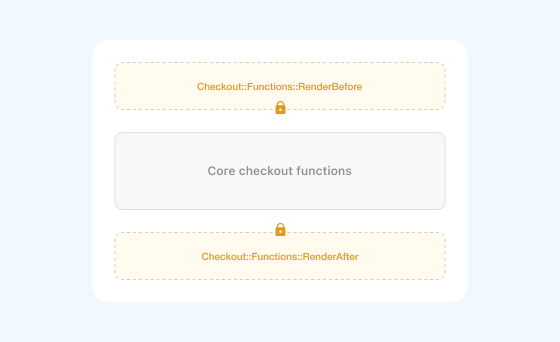
Static extension points are closely tied to the core functions of the checkout page, such as contact information, shipping methods, and order summaries. SHOPLINE provides these extension points before and after most core checkout features. If a core checkout feature is not displayed, the static extension point bound to it will not appear either.
Merchants need to activate static extension points through the checkout editor. The positions of static extension points in the checkout editor are fixed, and merchants cannot change their display locations within the checkout editor.
The following figure shows the static extension points in the shipping method section on the checkout page.
Example
render("Checkout::CheckoutLines::RenderAfter", (props) => {
    return <Text>Hello World!</Text>;
});
Dynamic extension points
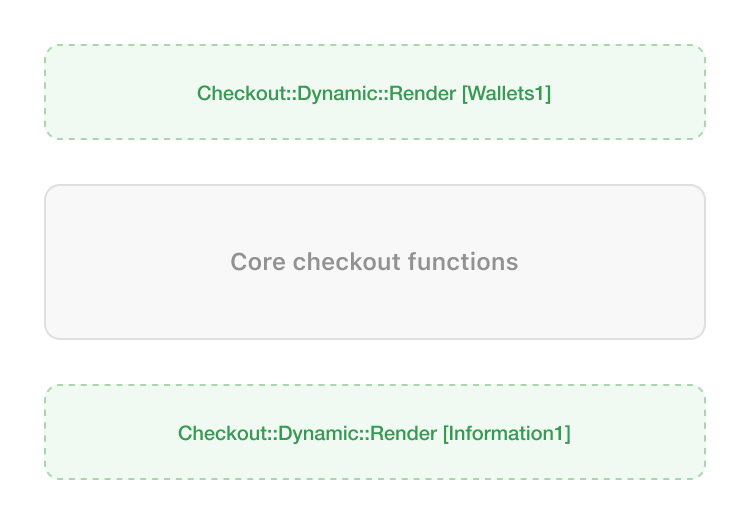
Dynamic extension points are independent of core checkout functions and can be positioned between each step of the checkout process. Merchants have the flexibility to adjust the position of each dynamic extension point in the checkout editor, placing it on the checkout page, the order status page, or the thank you page, according to their preferences.
Dynamic extension points will always be displayed and are not affected by changes in other elements on the checkout page. For example, even if the Express checkout module, as shown in the following figure, is not activated, the dynamic extension Information1 will still be displayed.
Example
render("Checkout::Dynamic::Render", (props) => {
    return <Text>Hello World!</Text>;
});
In the development mode, dynamic extension points are rendered at the position of Checkout::Dynamic::Render[Information1] by default. You can add the placement-reference parameter to the URL to specify the location where dynamic expansion points appear on the page. For example, url?placement-reference=Wallet1.
Checkout page extension points
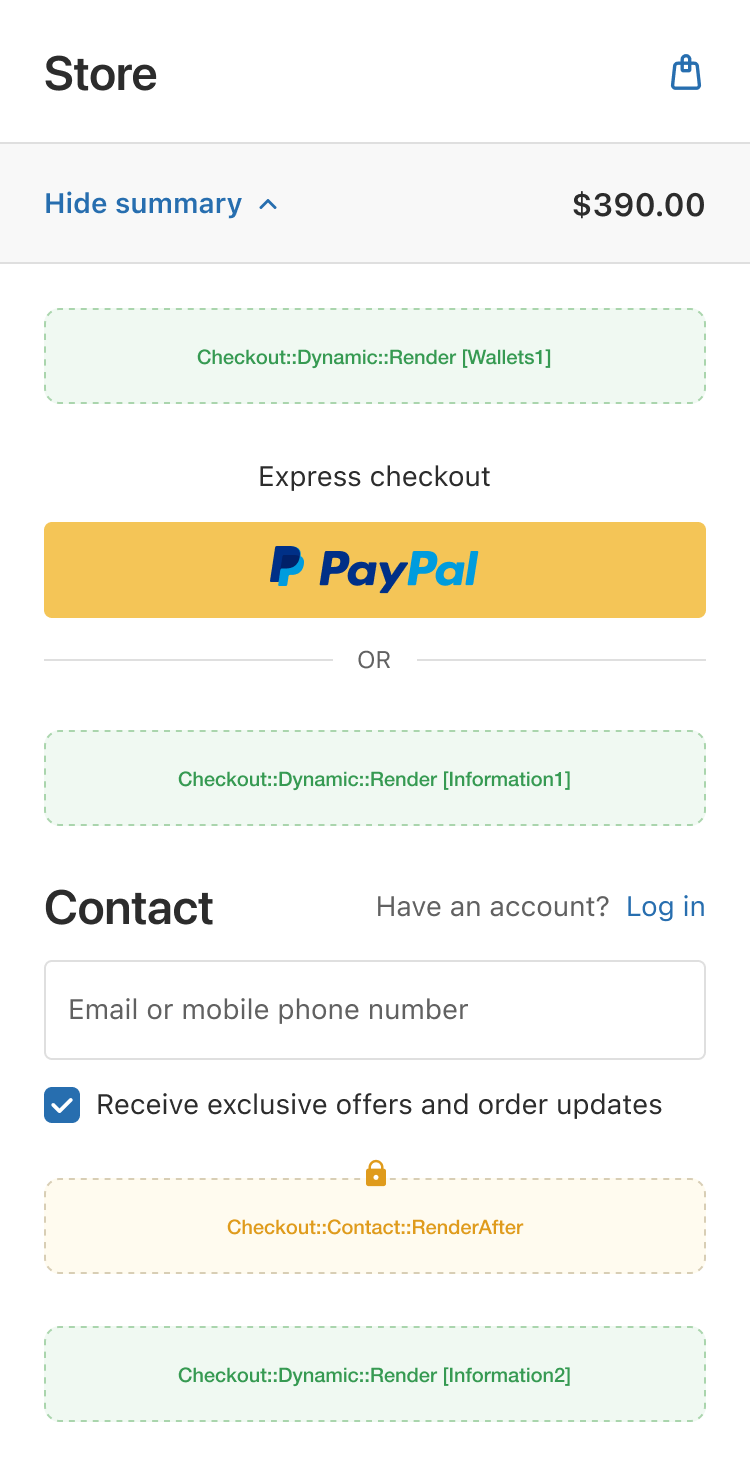
The checkout page is where buyers provide or confirm their contact, shipping, and payment information to finalize their order.
Contact information is the first step, where buyers must enter their contact details.
| Extension point name | Extension point type | Extension point description |
|---|---|---|
| Checkout::Dynamic::Render[Wallets1] | Dynamic | A dynamic extension point that is rendered before the Express checkout module |
| Checkout::Contact::RenderAfter | Static | A static extension point that is rendered after the contact information |
| Checkout::Dynamic::Render[Information1] | Dynamic | A dynamic extension point that is rendered before the contact information |
| Checkout::Dynamic::Render[Information2] | Dynamic | A dynamic extension point that is rendered after the contact information |
Thank you page & order status page extension points
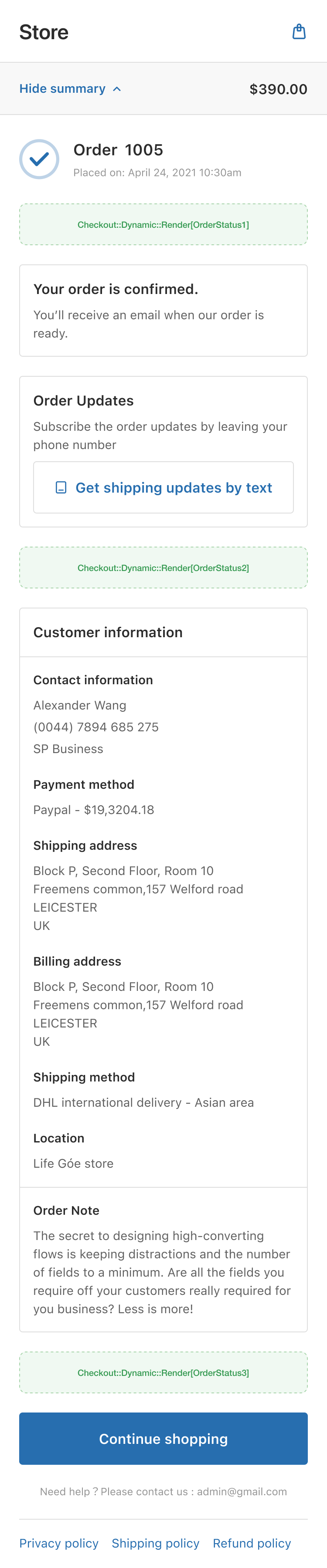
Immediately after a successful checkout, the buyer is redirected to the thank you page. This page also serves as the order status page, where buyers can return to track their shipping and order progress.
Displays all order information to the buyer.
| Extension point name | Extension point type | Extension point description |
|---|---|---|
| Checkout::Dynamic::Render[OrderStatus1] | Dynamic | A dynamic extension point that is rendered after the order number |
| Checkout::Dynamic::Render[OrderStatus2] | Dynamic | A dynamic extension point that is rendered after the order update subscription |
| Checkout::Dynamic::Render[OrderStatus3] | Dynamic | A dynamic extension point that is rendered after the customer information |

'%3e%3crect%20x='6'%20y='7.13049'%20width='13'%20height='10'%20rx='1'%20fill='black'/%3e%3cpath%20d='M12.4998%2012.936L-3.65042%200.604835L28.65%200.604838L12.4998%2012.936Z'%20stroke='white'%20stroke-linejoin='round'/%3e%3c/g%3e%3cdefs%3e%3cclipPath%20id='clip0_716_14611'%3e%3crect%20x='6'%20y='7.13049'%20width='13'%20height='10'%20rx='1'%20fill='white'/%3e%3c/clipPath%3e%3c/defs%3e%3c/svg%3e)

'%3e%3crect%20x='5.63086'%20y='7.26086'%20width='13'%20height='10'%20rx='1'%20fill='white'/%3e%3cpath%20d='M12.1306%2013.0664L-4.01956%200.735206L28.2809%200.735209L12.1306%2013.0664Z'%20stroke='%231A2C42'%20stroke-linejoin='round'/%3e%3c/g%3e%3cdefs%3e%3cclipPath%20id='clip0_716_14599'%3e%3crect%20x='5.63086'%20y='7.26086'%20width='13'%20height='10'%20rx='1'%20fill='white'/%3e%3c/clipPath%3e%3c/defs%3e%3c/svg%3e)