Overview
App Bridge is a JavaScript SDK provided by SHOPLINE that enables third-party apps embedded within the SHOPLINE Admin to interact with the platform. Through App Bridge, apps can invoke SHOPLINE's native functionalities (such as retrieving store information and opening modals) and integrate unified UI components, providing merchants with a smooth and consistent user experience.
Features
App Bridge primarily offers the following features:
- SHOPLINE Admin communication: App Bridge includes a built-in messaging mechanism for communication with the SHOPLINE Admin.
- UI component integration: App Bridge provides a series of UI components, such as Modal, Message, and Loading, to help you implement interactive experiences in your app that are consistent with the SHOPLINE interface.
- Routing: App Bridge offers routing functionality to manage and control navigation within the SHOPLINE Admin, ensuring merchants can smoothly browse their app and store.
- Secure authentication: App Bridge provides a secure authentication mechanism to ensure that only authorized apps can access store data, safeguarding the privacy and security of merchants and their customers.
Overall, App Bridge aims to simplify the app development process and improve app quality, thereby enabling apps to deliver a better user experience. This also allows you to focus more on providing valuable features for merchants without worrying about the complexities of underlying integrations.
Interaction logic
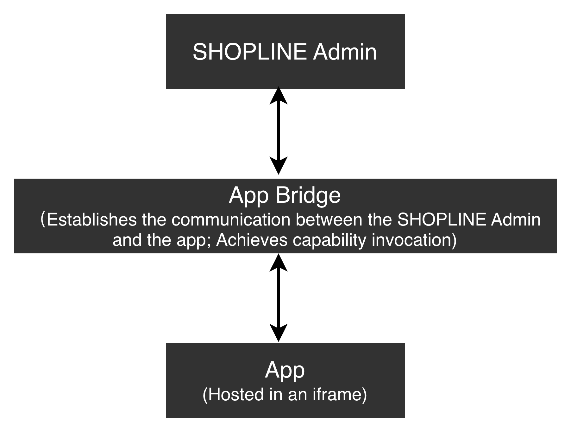
Diagram explanation: The above diagram illustrates the communication mechanism of App Bridge. The SHOPLINE Admin and the embedded app reside in separate runtime environments. App Bridge enables two-way communication through message passing, allowing the app to invoke SHOPLINE functionalities, and SHOPLINE to send event notifications to the app.
How it works: SHOPLINE loads the developer-provided app via an iframe. The iframe's security mechanism isolates the app from the main page of the SHOPLINE Admin, preventing direct data exchange and function calls between the two. To enable mutual communication, App Bridge acts as a bridge. It uses a standardized message format and communication protocol to allow the SHOPLINE Admin and the app to invoke functions of each other and exchange information, thereby ensuring consistent interaction.
Use case
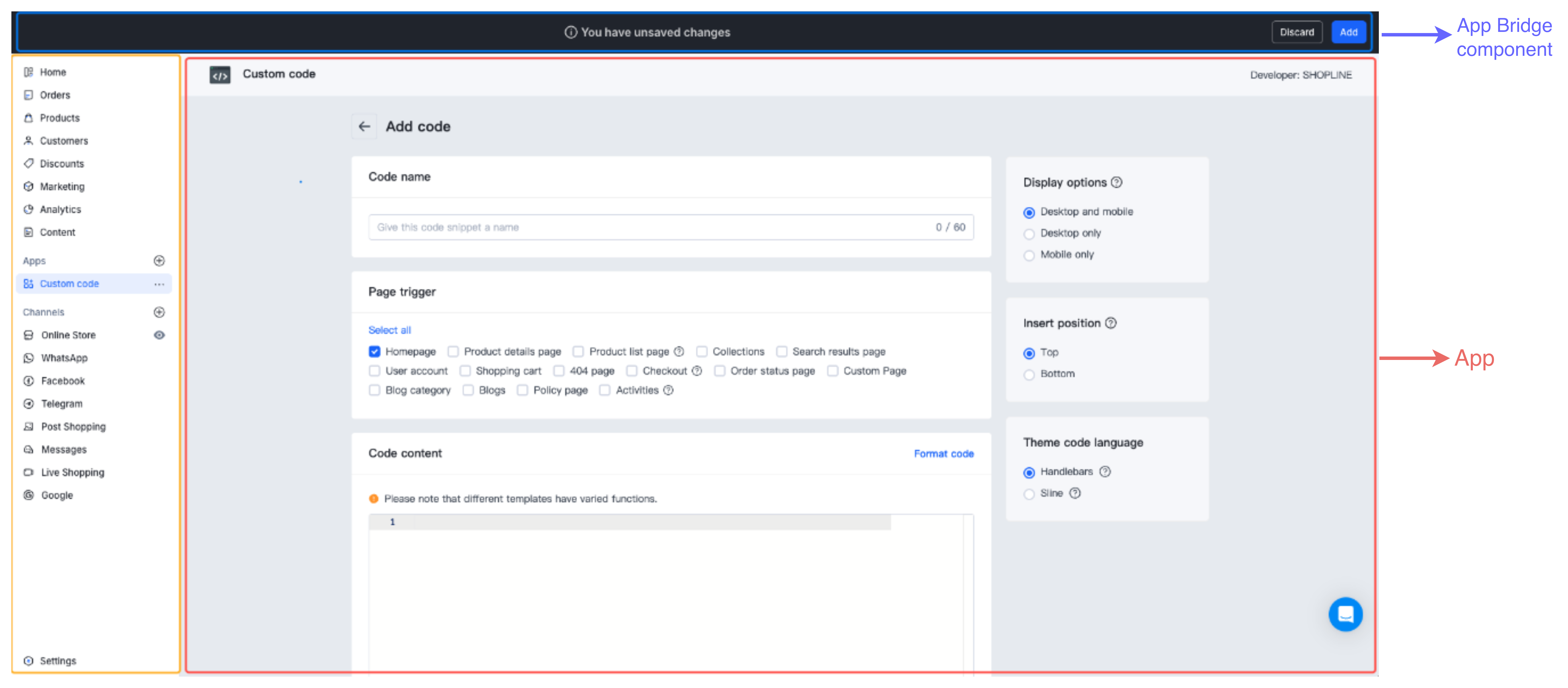
The above figure illustrates the architectural relationship of App Bridge in a practical application scenario:
- Left navigation area (marked with a yellow box): The main interface of the SHOPLINE Admin, containing standard navigation menus and various functional modules (Home, Orders, Products, Customers, and so on).
- Central main area (marked with a red box): Your app embedded into the SHOPLINE Admin via an iframe, hosting its own independent interface and business logic. The figure shows an example page of an app named Custom Code.
- Top action bar (marked with a blue box): A SHOPLINE unified component (the SaveBar component) rendered via App Bridge.
This architecture allows your app to run in an isolated iframe environment and invoke native components and functionalities of the SHOPLINE Admin through App Bridge. This enables a unified and seamless operational experience for merchants.

'%3e%3crect%20x='6'%20y='7.13049'%20width='13'%20height='10'%20rx='1'%20fill='black'/%3e%3cpath%20d='M12.4998%2012.936L-3.65042%200.604835L28.65%200.604838L12.4998%2012.936Z'%20stroke='white'%20stroke-linejoin='round'/%3e%3c/g%3e%3cdefs%3e%3cclipPath%20id='clip0_716_14611'%3e%3crect%20x='6'%20y='7.13049'%20width='13'%20height='10'%20rx='1'%20fill='white'/%3e%3c/clipPath%3e%3c/defs%3e%3c/svg%3e)

'%3e%3crect%20x='5.63086'%20y='7.26086'%20width='13'%20height='10'%20rx='1'%20fill='white'/%3e%3cpath%20d='M12.1306%2013.0664L-4.01956%200.735206L28.2809%200.735209L12.1306%2013.0664Z'%20stroke='%231A2C42'%20stroke-linejoin='round'/%3e%3c/g%3e%3cdefs%3e%3cclipPath%20id='clip0_716_14599'%3e%3crect%20x='5.63086'%20y='7.26086'%20width='13'%20height='10'%20rx='1'%20fill='white'/%3e%3c/clipPath%3e%3c/defs%3e%3c/svg%3e)