Overview
SHOPLINE fulfillment service providers (referred to as FSPs) are entities responsible for product fulfillment and shipping. By offering professional, integrated logistics solutions (such as Amazon MCF), FSPs enable merchants to manage multi-channel sales, streamline order fulfillment, and handle returns or exchanges.
In SHOPLINE, an FSP delivers its services through a fulfillment app. Once a merchant installs a fulfillment app, the app registers as the merchant's FSP and creates and manages a dedicated location under that FSP role.
A location represents a physical warehouse where products are stored and fulfilled. Each fulfillment app has its own location and exclusively manages the location. Products assigned to a specific fulfillment app must always be fulfilled and shipped from that app's location.
Scenarios and advantages
Core scenarios
Fulfillment apps are typically used to streamline product fulfillment and shipping in the following scenarios:
- Centralized shipping in ERP: An ERP system is integrated into a selling platform as a fulfillment app, and merchants process orders and shipping centrally in the ERP, which automatically synchronizes shipping status to the platform.
- Specialized logistics tracking: Merchants use a specialized fulfillment app to gain logistics tracking and status update capabilities, thereby enhancing the customer experience.
- Multi-channel warehousing integration: Merchants use a fulfillment app integrated with third-party logistics services to route orders from multiple channels into the warehouse management system. Once the warehouse completes shipping, the fulfillment app synchronizes the logistics information back to each platform.
Advantages
By offloading complex warehousing and logistics to specialized fulfillment apps, merchants can focus on core business activities, such as product development and marketing, thereby driving operational efficiency and elevating the customer experience.
How fulfillment apps work
Merchants map the products displayed in the SHOPLINE Admin to the physical items stored in an FSP warehouse using the corresponding fulfillment app. The inventory location for these products must be set to the app's dedicated fulfillment location. When merchants change their inventory on the FSP platform, the fulfillment app automatically synchronizes the data to SHOPLINE using the Update item inventory API.
Once an order is processed, SHOPLINE automatically groups products with the same fulfillment location into a fulfillment order. When the merchant requests shipping, SHOPLINE will trigger a fulfillment request to notify the respective fulfillment app. The app is responsible for processing and shipping items within the fulfillment orders assigned to its specific location only.
Below is the shipping workflow:
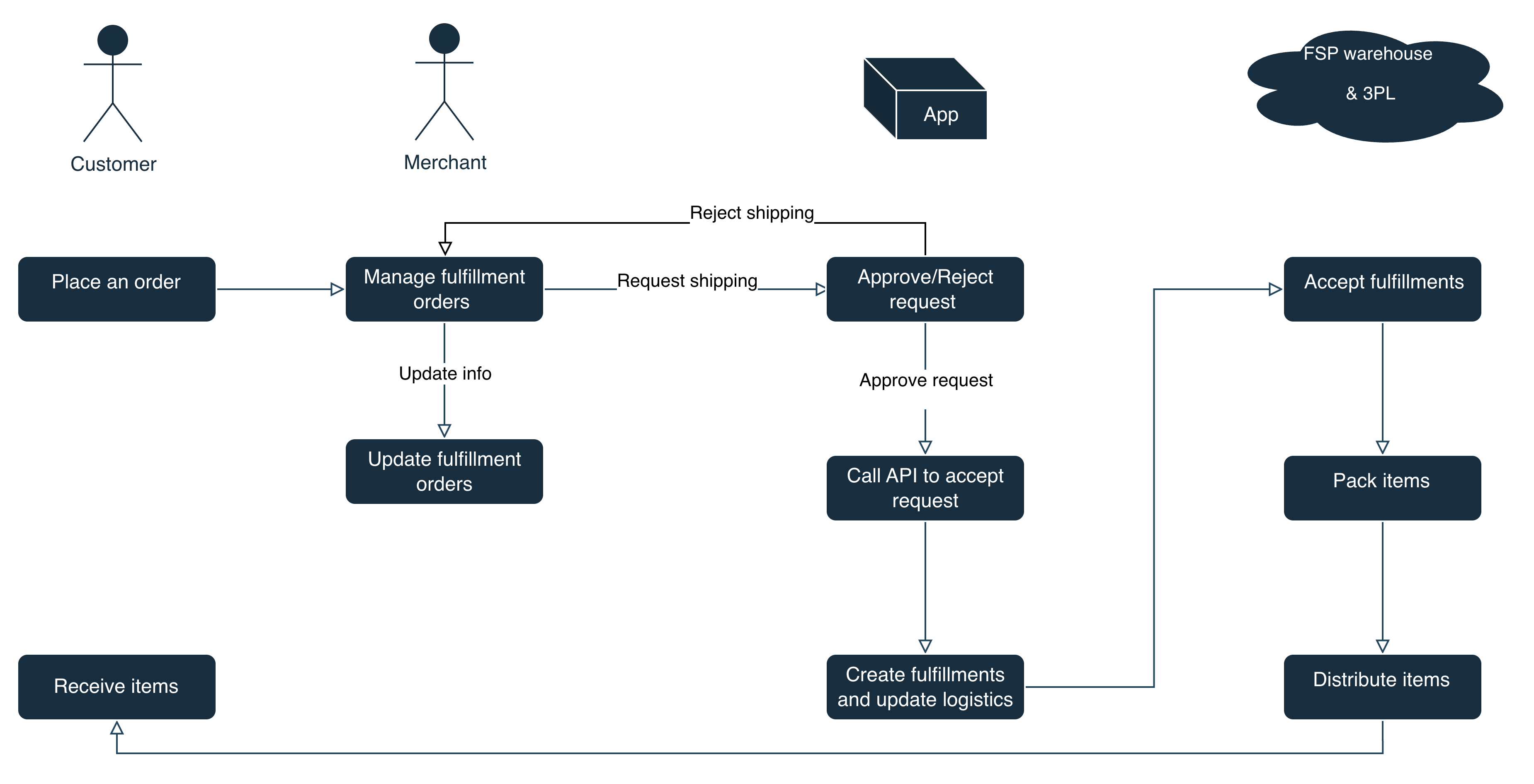
- Merchant: After a customer places an order, the merchant can modify order items as needed before initiating a fulfillment request via the fulfillment app. If the merchant wants to cancel the fulfillment request, they can submit a cancellation request.
- Fulfillment app: The fulfillment app evaluates incoming fulfillment requests and can either accept or reject them. If the app accepts a request, the corresponding items will be packed and delivered to the customer. If a merchant requests cancellation after the app has accepted the fulfillment request, the app approves or rejects the cancellation based on real-time logistics status. For example, if the warehouse has not processed the order, the cancellation can be approved. If the fulfillment app rejects the cancellation, the shipping will proceed as scheduled.
- Third-party logistics (3PL): Once the fulfillment app accepts a request, the FSP warehouse packs the items and transfers them to a 3PL carrier.
- Customer: Receives and signs for the delivered items.
Permissions and access scopes
- Your app has been authorized as instructed in App authorization and has obtained access to REST APIs.
- Your app requires the following access scopes to operate:
write_fulfillment_service,read_assigned_fulfillment_orders, andwrite_assigned_fulfillment_orders. For more information on access scopes requested during app installation, refer to AccessScope.
FSP management APIs
FSP
When a merchant installs a fulfillment app, the app calls the Create a fulfillment service API to create an FSP role for that merchant.
Example:
- POST:
https://{handle}.myshopline.com/admin/openapi/v20260301/fulfillment_service.json - Request body:
{
  "name": "MCF test"
}
- Response body:
{
  "fulfillment_service": {
    "name": "MCF test",
    "id": "4106281043992999650327",
    "location_id": "6255171172604321136"
  }
}
Merchants can update or delete existing FSP roles using Modify a fulfillment service or Delete a fulfillment service API.
The following table lists all FSP management APIs:
| API name | Description | Note |
|---|---|---|
| Create a fulfillment service | Create a new fulfillment service. | An app can create only one fulfillment service for a merchant. |
| Modify a fulfillment service | Modify an existing fulfillment service. | - |
| Delete a fulfillment service | Remove a specified fulfillment service. | When a merchant decides to stop using an FSP and wants to delete related data, they must first delete the FSP location within the fulfillment app. SHOPLINE does not provide a native location management portal, so the merchant must clear or reallocate product inventory and delete the location before uninstalling the fulfillment app. |
| Get a fulfillment service | Get the details of a specified fulfillment service. | - |
| Get all fulfillment services | Get a list of all fulfillment services. | - |
Fulfillment location
Once a fulfillment service (an FSP role) is created, the fulfillment app calls the Create a fulfillment location API to create a dedicated location for the FSP. This location can only be managed by the merchant through the FSP role.
An app can create only one fulfillment location for a merchant.
Example:
- POST:
https://{handle}.myshopline.com/admin/openapi/v20260301/fulfillment_service_location/create.json - Request body:
{
  "location": {
    "name": "MCF-location",
    "phone_code": null,
    "phone": "13322221111",
    "country_code": "SG",
    "country": "Singapore",
    "province_code": "",
    "province": "",
    "city_code": "",
    "city": "",
    "district_code": "",
    "district": "",
    "address1": "1874 prospect valley road",
    "address2": "",
    "zip": "999000"
  }
}
- Response body:
{
  "zip": "999000",
  "country": "Singapore",
  "legacy": true,
  "address2": "",
  "city": "",
  "address1": "1874 prospect valley road",
  "active": true,
  "create_at": "2024-01-08T18:20:55+08:00",
  "is_default": false,
  "province_code": "",
  "country_code": "SG",
  "province": "",
  "update_at": "2024-01-08T18:20:55+08:00",
  "phone": "13322221111",
  "name": "MCF-location",
  "id": "6281073353496741086",
  "phone_code": null
}
A fulfillment location is the foundational element enabling merchants to track inventory within a 3PL system. When a merchant assigns inventory to a fulfillment location, inventory data is synchronized directly from the fulfillment app to SHOPLINE. Before switching to another location, the merchant must properly handle the inventory at the current location to ensure data integrity.
More references
For more details on how an FSP fulfills and ships orders via its fulfillment app, refer to Shipping workflow.

'%3e%3crect%20x='6'%20y='7.13049'%20width='13'%20height='10'%20rx='1'%20fill='black'/%3e%3cpath%20d='M12.4998%2012.936L-3.65042%200.604835L28.65%200.604838L12.4998%2012.936Z'%20stroke='white'%20stroke-linejoin='round'/%3e%3c/g%3e%3cdefs%3e%3cclipPath%20id='clip0_716_14611'%3e%3crect%20x='6'%20y='7.13049'%20width='13'%20height='10'%20rx='1'%20fill='white'/%3e%3c/clipPath%3e%3c/defs%3e%3c/svg%3e)

'%3e%3crect%20x='5.63086'%20y='7.26086'%20width='13'%20height='10'%20rx='1'%20fill='white'/%3e%3cpath%20d='M12.1306%2013.0664L-4.01956%200.735206L28.2809%200.735209L12.1306%2013.0664Z'%20stroke='%231A2C42'%20stroke-linejoin='round'/%3e%3c/g%3e%3cdefs%3e%3cclipPath%20id='clip0_716_14599'%3e%3crect%20x='5.63086'%20y='7.26086'%20width='13'%20height='10'%20rx='1'%20fill='white'/%3e%3c/clipPath%3e%3c/defs%3e%3c/svg%3e)