theme.schema.json
theme.schema.json 是主题的全局配置定义及信息存储文件,位于项目根目录,用于定义:
-
主题信息:名称、版本、作者、支持链接等。
-
全局配置项:商家在主题编辑器中可配置的表单项(如颜色、字体)。
主题信息定义
主题基本信息涵盖主题名称、版本号、作者等,这些信息会被运用在 主题商城、主题编辑器、SHOPLINE 商家后台 等地方,让商家可以方便了解相关信息。
数据结构
以下是主题 Bottle 的主题信息示例:
// theme.schema.json
{
  "theme_name": "Bottle",                                                                 // 主题名称
  "theme_version": "1.0.0",                                                               // 主题版本号
  "theme_author": "SHOPLINE",                                                             // 主题作者
  "theme_documentation_url": "https://themes.shopline.com/themes/Bottle/styles/Default",  // 主题介绍地址
  "theme_support_url": "https://help.shopline.com/",                                      // 帮助中心链接
  "theme_type_version": "OS_3.0",                                                         // 渲染引擎版本
  "schemas": [...]
}
字段说明
字段 | 描述 | 示例 |
|---|---|---|
theme_name | 主题名称 |
|
theme_version | 主题版本号 |
|
theme_author | 主题作者 |
|
theme_documentation_url | 主题文档地址 |
|
theme_support_url | 帮助中心链接 |
|
theme_type_version | 渲染引擎版本 |
|
全局配置项定义
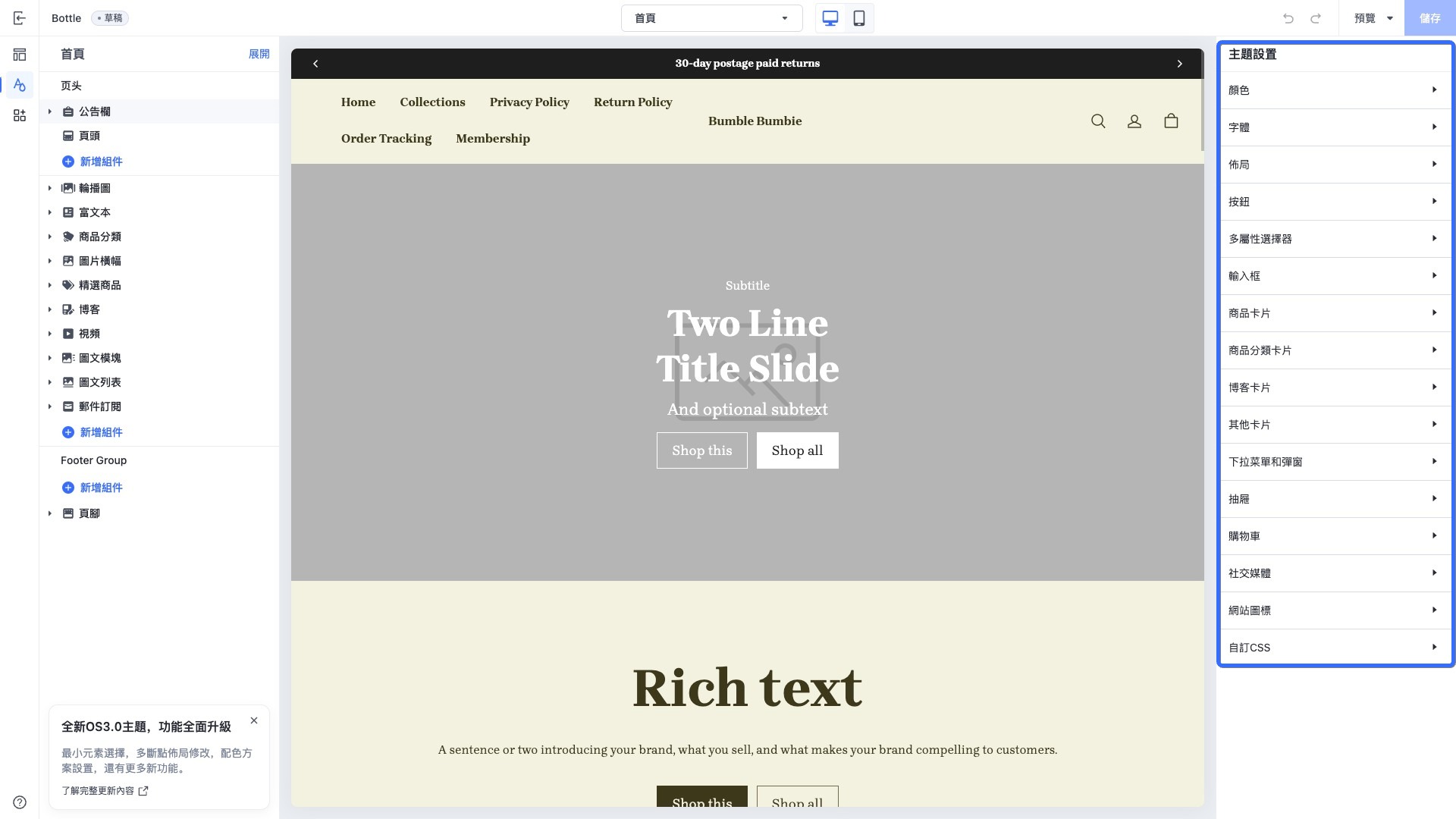
主题全局配置是主题的公共配置,一般会把主题的通用配置定义在全局配置中,例如以下几种场景:
-
字体:定义所有页面使用的字体。
-
输入框:定义所有页面输入框样式。
-
加购方式:定义所有加购跳转的交互方式。
所有的页面模板、组件、区块都可以通过 settings object 访问全局配置数据。
数据结构
以下是主题 Bottle 的全局配置项定义部分示例,它们存储在 schemas 字段里:
// theme.schema.json
{
  ...
  "schemas": [                       // 配置项集合
    {
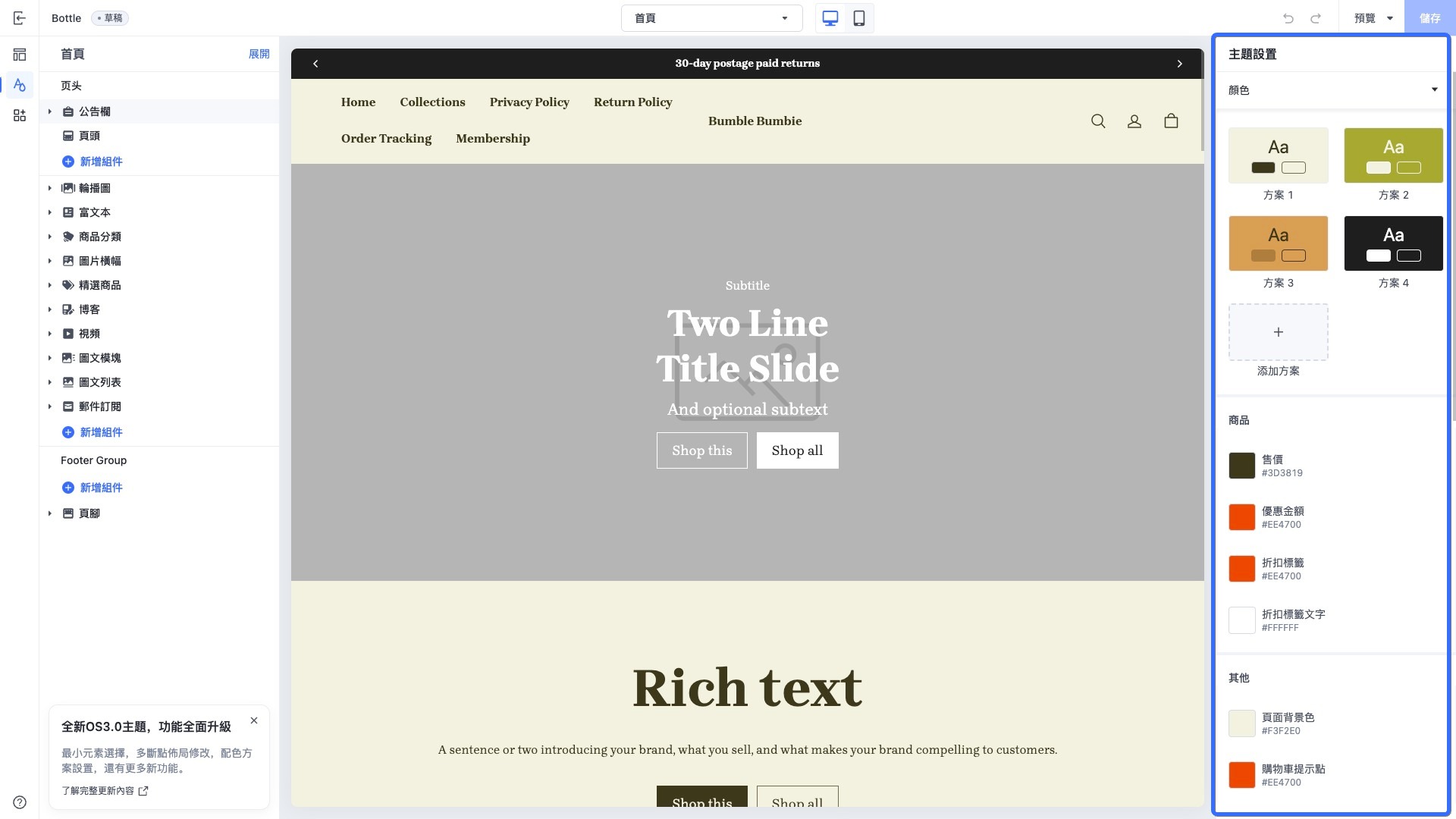
      "name": "Color",               // 配置分类名称
      "settings": [                  // 配置项列表
        {
          "type": "color",           // 配置项控件类型
          "label": "Sale",           // 配置项标签
          "id": "color_sale",        // 配置项唯一标识
          "default": "#3D3819"       // 配置默认值
        }
      ]
    },
    {
      "name": "Font",
      "settings": [
        {
          "type": "font",
          "label": "Font",
          "id": "title_font",
          "default": "Brygada 1918:700"
        }
      ]
    }
  ]
}
字段说明
字段 | 描述 | 示例值 |
|---|---|---|
schemas | 配置项分类集合 | |
name | 配置分类名称 |
|
settings | 配置项列表 | |
type | 配置项控件 类型(如 color、font) |
|
label | 配置项标签 |
|
id | 配置项唯一标识 |
|
default | 配置项默认值 |
|
应用场景示例
以下是主题 Bottle 在编辑器中的全局配置界面截图:

'%3e%3crect%20x='6'%20y='7.13049'%20width='13'%20height='10'%20rx='1'%20fill='black'/%3e%3cpath%20d='M12.4998%2012.936L-3.65042%200.604835L28.65%200.604838L12.4998%2012.936Z'%20stroke='white'%20stroke-linejoin='round'/%3e%3c/g%3e%3cdefs%3e%3cclipPath%20id='clip0_716_14611'%3e%3crect%20x='6'%20y='7.13049'%20width='13'%20height='10'%20rx='1'%20fill='white'/%3e%3c/clipPath%3e%3c/defs%3e%3c/svg%3e)

'%3e%3crect%20x='5.63086'%20y='7.26086'%20width='13'%20height='10'%20rx='1'%20fill='white'/%3e%3cpath%20d='M12.1306%2013.0664L-4.01956%200.735206L28.2809%200.735209L12.1306%2013.0664Z'%20stroke='%231A2C42'%20stroke-linejoin='round'/%3e%3c/g%3e%3cdefs%3e%3cclipPath%20id='clip0_716_14599'%3e%3crect%20x='5.63086'%20y='7.26086'%20width='13'%20height='10'%20rx='1'%20fill='white'/%3e%3c/clipPath%3e%3c/defs%3e%3c/svg%3e)