customers/login
customers/login 模板渲染了客户登录页面,该页面包含了登录客户帐户的表单。
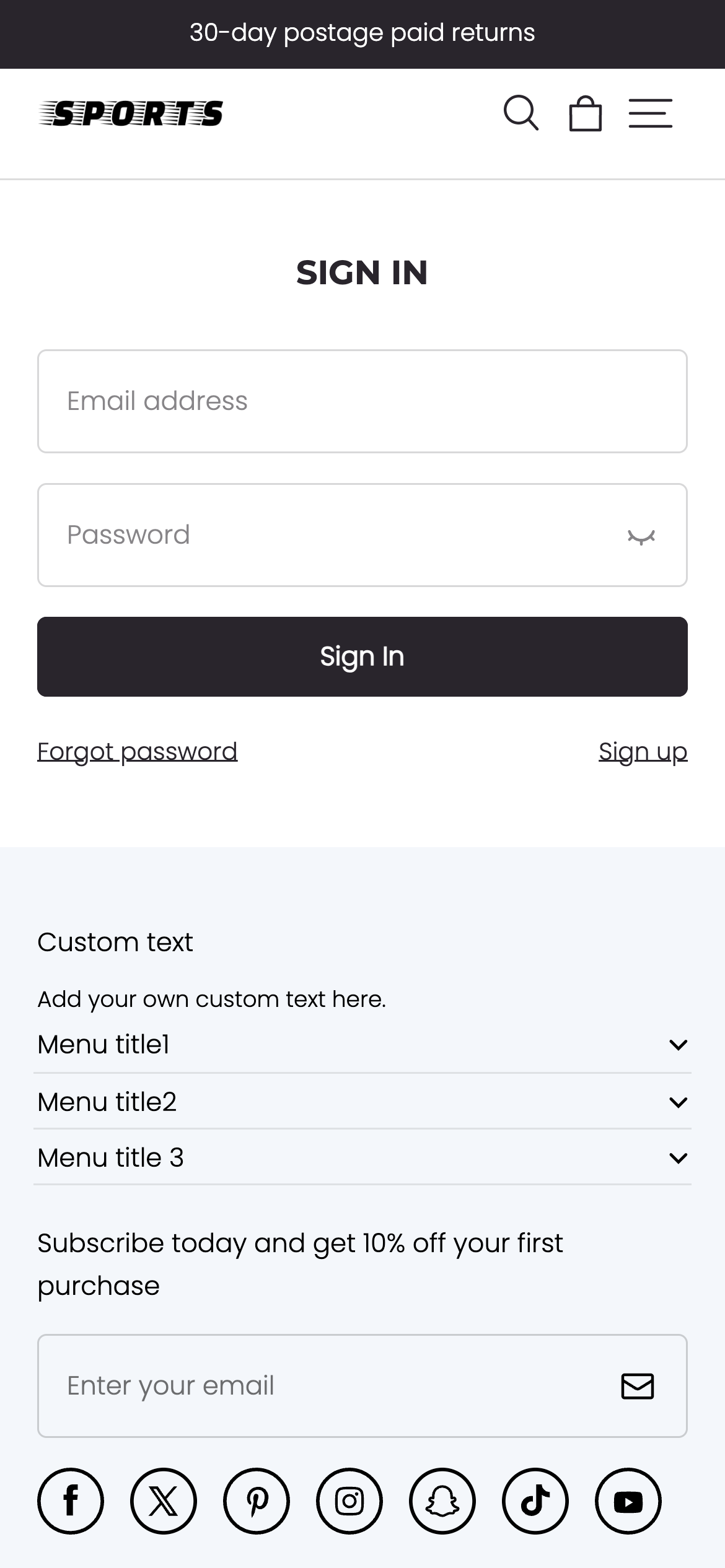
位置
customers/login 模板位于主题的 templates/customers 目录中:
└── theme
    ├── layout
    ├── templates
    |   └── customers
    |     ├── login.json
    |     ...
    ...
内容
你可以将客户登录表单包含在 customers/login 模板中或模板内的某个 section 中。
你也可以选择性地包含“第三方登录”选项。
客户登录表单
客户登录表单可以通过使用 Handlebars form helper 以及相应的 'customer_login' 参数来添加。在表单标签内,你需要包含以下内容:
| 字段 | 类型 | 表单name |
|---|---|---|
| 邮箱 | customer[email] | |
| 手机号 | text | customer[phone] |
| 密码 | password | customer[password] |
| 号码区号 | text | customer[code] |
你应该支持手机号和邮箱两种登录方式。只有手机号登录时才需要提供号码区号字段,两者是结合使用的。
示例代码:
<div class="email">
<label for="email">Email</label>
<input type="email" name="customer[email]">
</div>
<div class="password">
<label for="password">Password</label>
<input type="password" name="customer[password]">
</div>
<div class="submit">
<input type="submit" value="Sign in">
</div>
用法
在使用 customers/login 模板时,你应该熟悉以下内容:
如果你使用的是 JSON templates,那么任何 HTML 或 Handlebars 代码都需要包含在模板引用的 section 中。
链接到登录页面
在链接到登录页面时,你需要考虑商店的客户账号设置以及当前的登录状态。
例如,如果客户账号未启用,则无需显示任何链接。如果客户已经登录,那么你可以链接到账户页面。如果客户账号已启用、是可选的,并且客户尚未登录,那么可以显示注册页面的链接。
<a class="icon-button header__icon-button" href="">
</a>
提供“忘记密码”选项
你可以向客户提供跳转到忘记密码页面的链接,帮助客户重置密码:
<a href="">Forget password</a>
提供“手机号登录”选项
在实现手机号登录功能时,需要为用户提供一个选择区号的选项,区号数据可以通过 all_country_dialing_code 对象来获取:
<div class="field">
<input
class="field__input"
type="tel"
id="RegisterPhone"
name="customer[phone]"
required
placeholder=""
/>
<label for="RegisterPhone" class="field__label body3">
</label>
</div>
<div class="field__suffix">
<select name="customer[code]" id="country-select">
<option value="" data-iso-code=""></option>
</select>
</div>
提供“第三方登录”选项
你可以向客户提供第三方登录的选项,可以使用 Handlebars form helper 以及相应的 customer_login 和 thirdLogin = true 参数来添加。并使用 loadFeatured 来引入 customer-account-api SDK,以处理第三方登录逻辑:
...
<div class="customer-third-login">
<div class="customer-third-login__desc">
<span class="body4"></span>
</div>
<div class="customer-third-login__btns">
<div id="third-login-container"></div>
</div>
</div>
有关示例的实现,请参阅 Seed 中的 assets/section-main-login.js 及 sections/main-login.html 文件。
登录后重定向
默认情况下,当客户登录成功后,他们会直接被重定向到账户页面。你可以使用 Handlebars form helper 的 return_to 参数来指定客户登录成功后应该重定向到的页面。
以下示例展示了如何将客户重定向到产品系列列表页面的 URL:
<!-- form content -->

'%3e%3crect%20x='6'%20y='7.13049'%20width='13'%20height='10'%20rx='1'%20fill='black'/%3e%3cpath%20d='M12.4998%2012.936L-3.65042%200.604835L28.65%200.604838L12.4998%2012.936Z'%20stroke='white'%20stroke-linejoin='round'/%3e%3c/g%3e%3cdefs%3e%3cclipPath%20id='clip0_716_14611'%3e%3crect%20x='6'%20y='7.13049'%20width='13'%20height='10'%20rx='1'%20fill='white'/%3e%3c/clipPath%3e%3c/defs%3e%3c/svg%3e)

'%3e%3crect%20x='5.63086'%20y='7.26086'%20width='13'%20height='10'%20rx='1'%20fill='white'/%3e%3cpath%20d='M12.1306%2013.0664L-4.01956%200.735206L28.2809%200.735209L12.1306%2013.0664Z'%20stroke='%231A2C42'%20stroke-linejoin='round'/%3e%3c/g%3e%3cdefs%3e%3cclipPath%20id='clip0_716_14599'%3e%3crect%20x='5.63086'%20y='7.26086'%20width='13'%20height='10'%20rx='1'%20fill='white'/%3e%3c/clipPath%3e%3c/defs%3e%3c/svg%3e)